
To automate CI/CD security for SOC 2, run five types of security scans in the pipeline, fail the build on critical findings, and send the results to a ticketing system and a GRC platform. The scan logs and tickets become your audit evidence for the SOC 2 Trust Services Criteria, mainly CC7.1 (vulnerability scans and configuration standards) and CC8.1 (testing changes).
- SAST: CodeQL or Semgrep
- SCA: OSV-Scanner
- DAST: OWASP ZAP
- Container image scanning: Trivy or Clair
- Docker host auditing: Docker Bench Security
Why automate CI/CD security for SOC 2?
SOC 2 compliance shows customers you meet the 2017 Trust Services Criteria (TSP Section 100) for security, plus availability, processing integrity, confidentiality, and privacy when those are in scope. Manual security checks slow down fast release cycles. Scans built into the pipeline keep pace with every change. This guide shows one practical approach among several valid ones.
The Core Principle
Scans inside the development workflow catch vulnerabilities early, cut remediation cost, and generate audit evidence on every change. The evidence supports CC7.1 (vulnerability scans and configuration standards) and CC8.1 (testing system changes before deployment).
Which security scans belong in a SOC 2 pipeline?
The shift-left approach builds security into every stage, from commit to deployment. SOC 2 auditors expect consistent, automated coverage across the stack:
Automated scans create a feedback loop that catches issues before production and leaves an auditable trail for SOC 2.
How do you implement SAST, SCA and DAST in a CI/CD pipeline?
Run the scans in the CI/CD platform you already use: GitHub Actions, GitLab CI/CD, CircleCI, or Jenkins.
How does self-hosted CI/CD meet SOC 2 requirements?
On self-hosted or on-premise CI/CD, such as GitHub Actions self-hosted runners, GitLab Runner or Jenkins agents, your team also patches the runner hosts, limits who can access them and keeps their logs. Auditors ask for evidence of all three, on top of the scan results.
For Jenkins and self-hosted runners, SOC 2 controls for self-hosted automation lists the access, secrets, change control and logging evidence auditors ask for.
What does a GitHub Actions workflow look like?
The diagram below follows a change through a GitHub Actions pipeline: which scans can gate the build, where each tool reports findings, how triage decides what becomes a Jira ticket, and how evidence reaches the GRC platform.
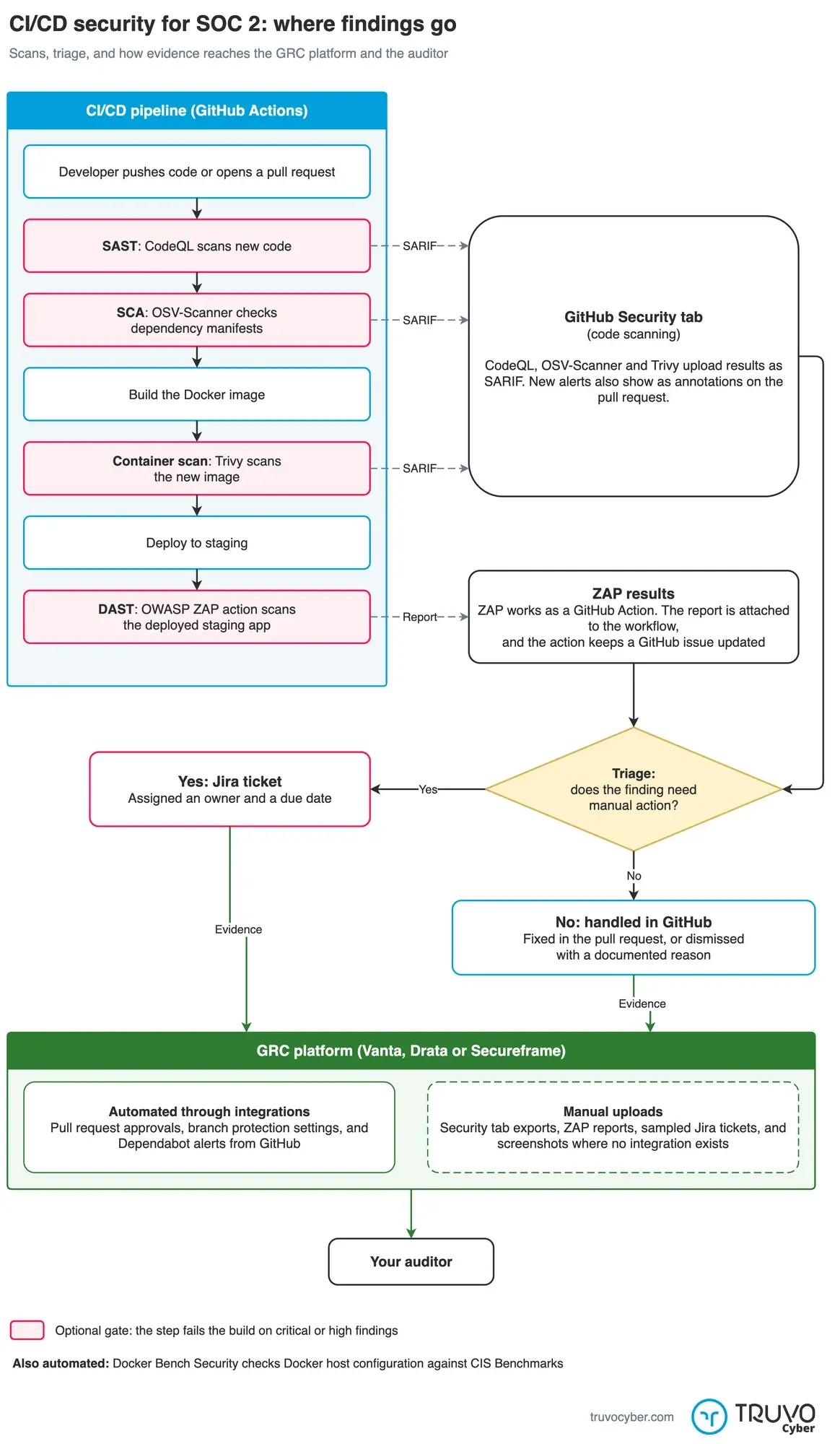
Scan results go to the GitHub Security tab. Only findings that need manual action become Jira tickets. Click to enlarge.
Security as a Gate, Not a Suggestion
Fail the build or block the deployment on critical findings. Every step leaves logs and reports, so the pipeline enforces your security policy and produces audit evidence at the same time.
How do GRC platforms use the pipeline evidence?
Automated scans give you a steady stream of evidence, so nobody scrambles before the audit.
GRC platforms like Secureframe, Vanta, and Drata integrate with your CI/CD tools, ticketing systems, and cloud providers to:
Beyond SOC 2
The pipeline also serves other frameworks. For ISO 27001, the same scans support ISO 27001:2022 Annex A controls A.8.8 (management of technical vulnerabilities), A.8.25 (secure development life cycle), A.8.29 (security testing in development and acceptance), and A.8.9 (configuration management). For CMMC, the continuous monitoring and evidence generation directly support audit requirements for securing your development pipeline.
Where do you start?
- Assess what your current CI/CD pipeline already scans
- Add the missing scan types, starting with SAST, SCA, and container scanning
- Fail builds on critical findings and route the rest to tickets
- Connect a GRC platform so the evidence maps to SOC 2 automatically
Building an Effective Security Program?
As your fractional security team and vCISO, we get teams SOC 2 ready without slowing down development.
Frequently Asked Questions
What CI/CD security scans do SOC 2 auditors expect to see?
Evidence of vulnerability management across the development lifecycle: static analysis (SAST), dependency scanning (SCA), dynamic testing (DAST), and container image scanning. Auditors care less about specific tools and more about consistent, automated coverage with documented remediation.
What are the best CI/CD tools for SOC 2 compliance?
Free and open-source tools cover all five scan types and auditors accept them: CodeQL or Semgrep for SAST, OSV-Scanner for SCA, OWASP ZAP for DAST, Trivy or Clair for container images, and Docker Bench Security for host auditing. Run them in your existing CI/CD platform, fail builds on critical findings, and route results to a ticketing system. A GRC platform such as Secureframe, Vanta, or Drata then maps the output to the Trust Services Criteria.
Can I use free or open-source tools for SOC 2 CI/CD security?
Yes. Semgrep, OSV-Scanner, OWASP ZAP, Trivy, and Docker Bench Security are open source, CodeQL is free for public repositories, and auditors widely accept all of them. What matters is that scans run automatically, findings are tracked in a ticketing system, and remediation is documented.
How does CI/CD security automation help with SOC 2 audit evidence?
Every automated scan leaves logs, reports, and timestamps that map to the Trust Services Criteria, mainly CC7.1 (vulnerability scans and configuration standards) and CC8.1 (testing changes before deployment). GRC platforms can pull the evidence automatically.
Do I need a GRC platform to pass a SOC 2 audit?
No, but a GRC platform cuts the manual work. Without one, your team exports scan reports, tracks remediation, and maps everything to SOC 2 criteria by hand, which gets hard to sustain as infrastructure grows.
How long does it take to set up automated CI/CD security scans?
A basic pipeline with SAST, SCA, and container scanning takes a few days in GitHub Actions or a similar platform. Adding DAST, notifications, and GRC platform connections usually takes a few more weeks, depending on the environment.
Which CI/CD providers are SOC 2 compliant?
GitHub, GitLab, CircleCI, Bitbucket Cloud and Azure DevOps each publish a SOC 2 Type 2 report. Customers get the reports through a trust center, enterprise account settings or a request form, usually behind an NDA or customer login. GitHub's report is self-serve only on Enterprise plans.
The provider's report covers the hosted platform only. Your auditor still tests your own pipeline: branch protection, required reviews, who can change workflow files, where secrets live and the scan results. Agree with your auditor whether the provider counts as a subservice organization or a vendor managed under CC9.2, and review the report every year. Self-hosted runners and Jenkins agents sit outside the provider's report, so their patching, access and logs are your controls.