


We recently used frontier AI throughout an incident response engagement, from the first log query to the final incident report. This is how it went, step by step, and what we would tell another team setting it up.
The short version: AI for incident response is most useful for the slow, mechanical work. It writes the scripts that pull data out of each log source, correlates the results, builds the timeline and drafts the report.
AI was also confidently wrong, often. Its summaries reached conclusions the data did not support, usually because it lacked context or data. So we ran the engagement as human-in-the-loop incident response: AI did the mechanical work, and a person checked every conclusion against the raw evidence before it counted.
This post is about using AI to run an incident response. Responding to an incident inside an AI system, such as a compromised agent, is a different problem, covered in our post on agentic AI security architecture.
The engagement in brief: an independent incident report and VAPT on a deadline
The client had a security incident in a production web application and needed two things from an independent firm, fast:
- An incident report covering scope of impact, root cause, timeline, and every containment, eradication and remediation step
- A vulnerability assessment and penetration test (VAPT) showing that no other exploitable weaknesses remained
The client's engineers had already contained the immediate problem. Our job was to verify what happened, confirm the fixes held, and document it to a standard an outside party would accept.
The deadline was days, not weeks. That deadline is what made AI worth using, and also what made checking its work non-negotiable.
The approach: human-in-the-loop incident response
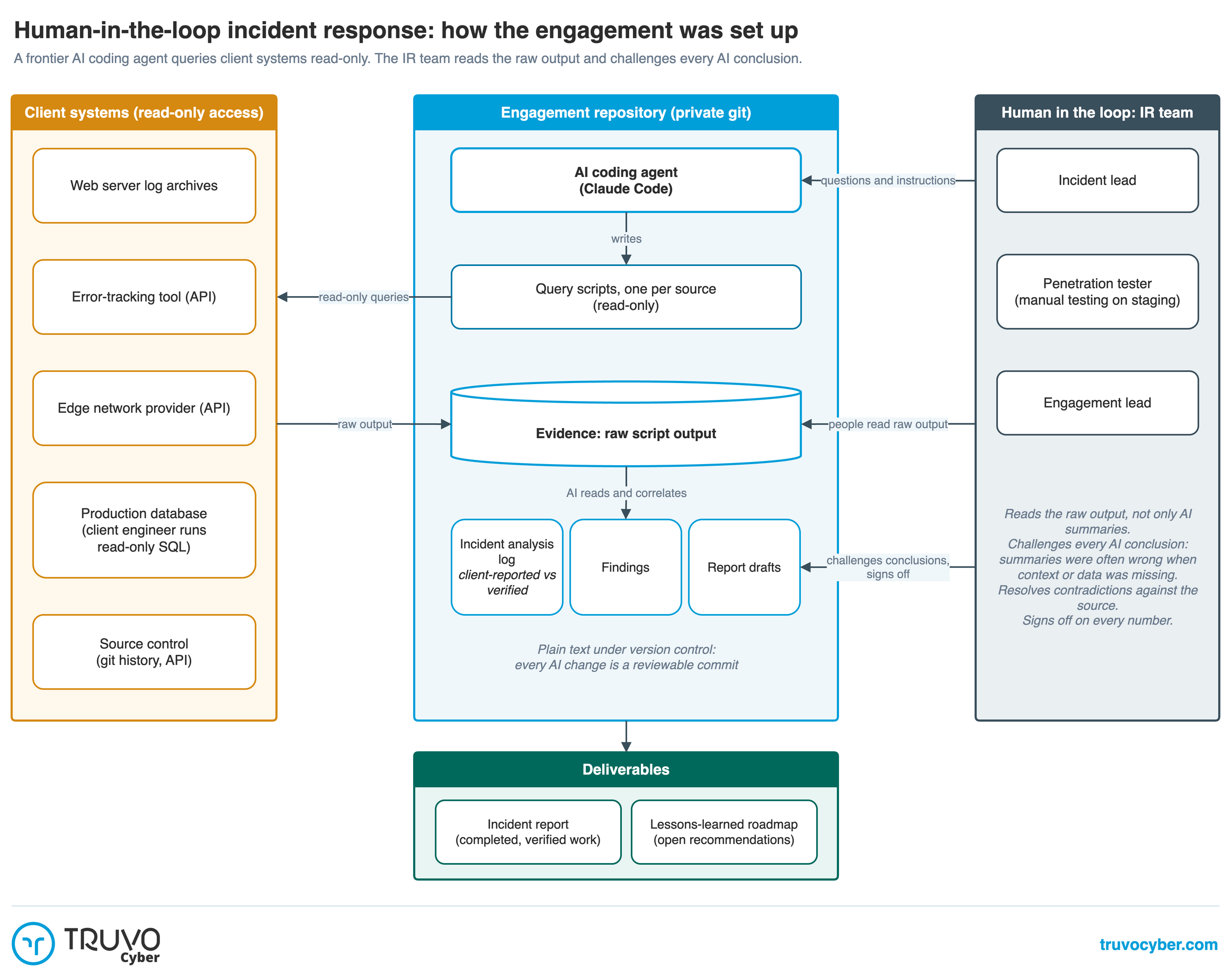
Human-in-the-loop incident response means AI does the mechanical work and a person owns every conclusion and decision. We set it up with four rules.
One engagement repository. Evidence, the incident analysis log, findings and report drafts all lived in a single private git repository as plain text. A frontier AI coding agent (Claude Code) worked inside it alongside our incident lead, penetration tester and engagement lead. Every AI change was a reviewable commit.
Read-only access to client systems. The AI-written scripts queried logs, APIs and databases with read-only credentials. Where we had no direct access, AI wrote the query and the client's engineer ran it.
Raw output is the evidence. Every script saved its raw output next to any summary. The AI read the raw output to correlate it. People read the same raw output to check the AI's conclusions.
Every claim labelled. Each fact in the analysis log was tagged client-reported or verified, with the file or query that proved it.
How AI fit each incident response step: NIST SP 800-61r3 and SANS PICERL
AI did most of its work in incident analysis and report drafting. It did little in preparation and none of the decision-making in containment, eradication or recovery.
NIST SP 800-61 Rev. 3 (April 2025) models incident response on the CSF 2.0 functions: Detect, Respond and Recover are the response itself, and Govern, Identify and Protect cover preparation. The table maps each part to the matching SANS PICERL step and shows how the work split.
| NIST SP 800-61r3 (CSF 2.0) | SANS PICERL step | What AI did | What stayed with people |
| Preparation (Govern, Identify, Protect) | Preparation | Nothing during the incident; earlier preparation decided which logs existed | Logging and detection recommendations |
| Detect: adverse event analysis (DE.AE) | Identification | Correlated logs to find earlier suspicious activity | Separating attacker activity from background noise |
| Respond: incident analysis (RS.AN) | Identification | Log-query scripts, correlation, timeline, scope of impact, root-cause search | Challenging every AI summary against the raw output |
| Respond: incident mitigation (RS.MI) | Containment, Eradication | Found every instance of the root-cause flaw; the client used AI to write fixes | Testing the edge of each fix; manual penetration test |
| Respond: reporting and communication (RS.CO) | Lessons Learned | Drafted the incident report section by section | What went in the report; stakeholder communication; sign-off |
| Recover: incident recovery (RC.RP) | Recovery | Wrote the read-only queries that confirmed cleanup | Recovery decisions and retesting |
| Improvement (ID.IM) | Lessons Learned | Drafted recommendations | Prioritizing them |
The sections below go through each step: what happened, how AI was used, and what we learned.
Preparation: AI cannot make up for logs that were never kept
Preparation is everything done before the incident, and it decided how much the analysis could prove.
What happened. Web server logs were kept only on the application server, with limited history. The error-tracking tool recorded errors, not successful requests. The edge provider's plan did not include log export.
What we learned. A malicious request that works produces no error. Without request logs shipped off the server, part of the attacker's activity left no usable trace, and no amount of AI analysis could recover it.
Preparation is where an incident response is won or lost, and AI does not change that.
Detection and analysis: AI wrote the queries, people challenged the conclusions
Incident analysis took most of the effort and got the most help from AI.
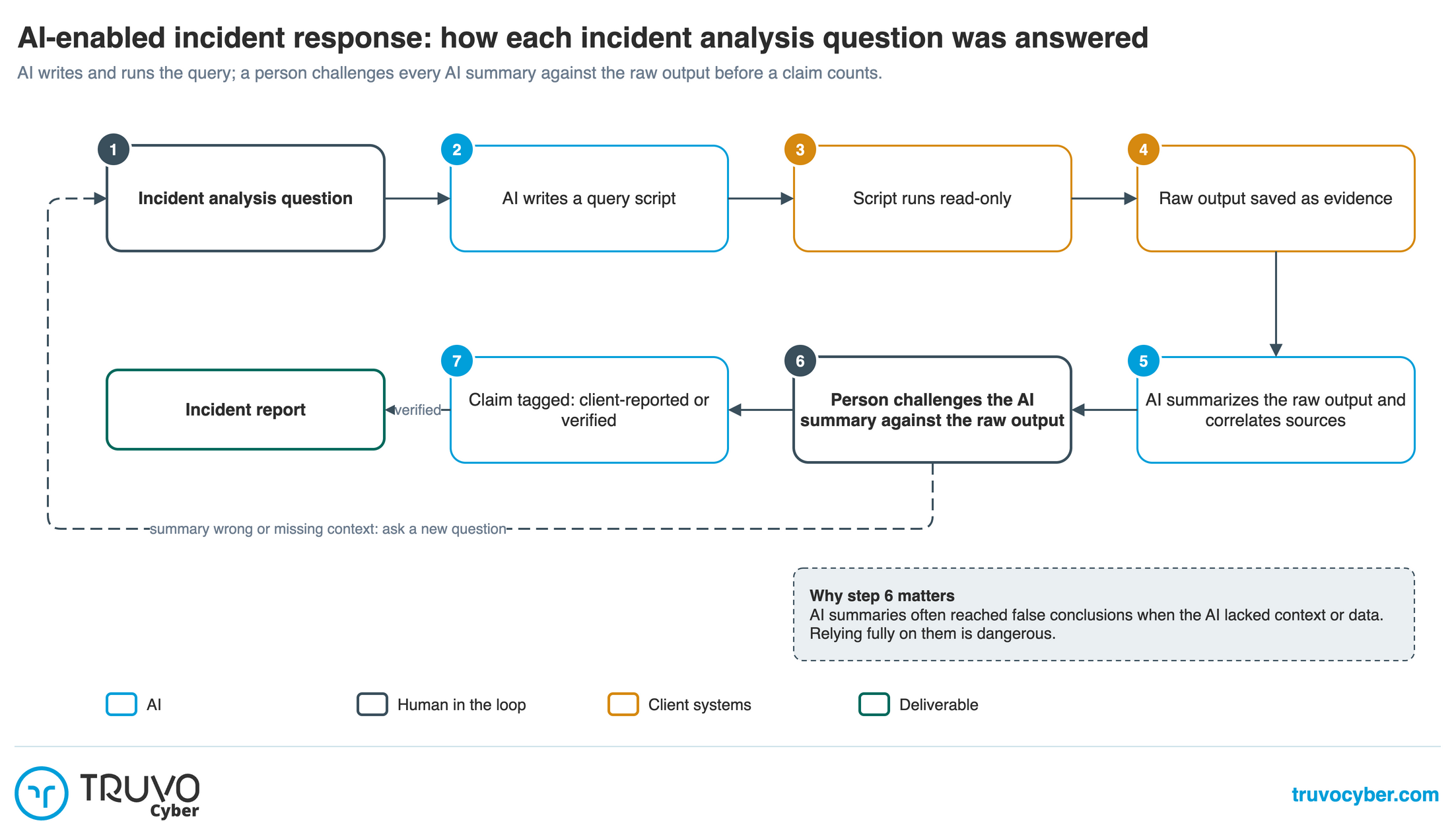
How AI was used. For each question, we described the data we needed in plain language. AI wrote a script for the right log source, ran it read-only, saved the raw output, and summarized and correlated the results across sources. Questions that would have meant hours of manual querying were answered much faster.
What people did. A person checked every AI summary against the raw output before it entered the analysis log. We did not read every script line by line. Read-only access limited what a wrong script could do, so the review effort went into the output.
What we learned. The AI's summaries were often wrong, and almost always for the same reason: missing context or missing data. On this engagement:
- An early count of affected records came from a single incomplete log extract. Summarized on its own, it understated the impact.
- A burst of old errors looked like an earlier start to the attack. The full request detail showed it was unrelated background scanning.
- An account that looked malicious turned out to be benign. Only the client's business context could show that.
Relying fully on AI summaries in incident response is dangerous. A summary reads just as confident when the data behind it is incomplete. In our process, an AI summary was a lead to check, not a finding.
Containment and eradication: test the edge of every fix
Containment stops the damage; eradication removes the cause. AI helped with eradication and with writing fixes, and people tested them.
How AI was used. Once the root cause was clear, AI searched the whole codebase for every other instance of the same flaw. That search found more instances than the client's own review had. The client's engineers also used AI to scan their code and write fixes.
What we learned. The first containment fix closed the obvious path but left a related one open; a second fix completed eradication. AI-written fixes carry the same risk: they solve the stated problem and miss the adjacent one.
What people did. Our penetration tester ran a manual, source-code-assisted test of everything reachable from outside. It still found further high-severity issues after the AI-assisted fixes were in. AI code scanning is a lead list, not a verdict.
Reporting and communication: draft from a plan, review section by section
The incident report is the deliverable that outside parties read, so every number in it has to trace to evidence.
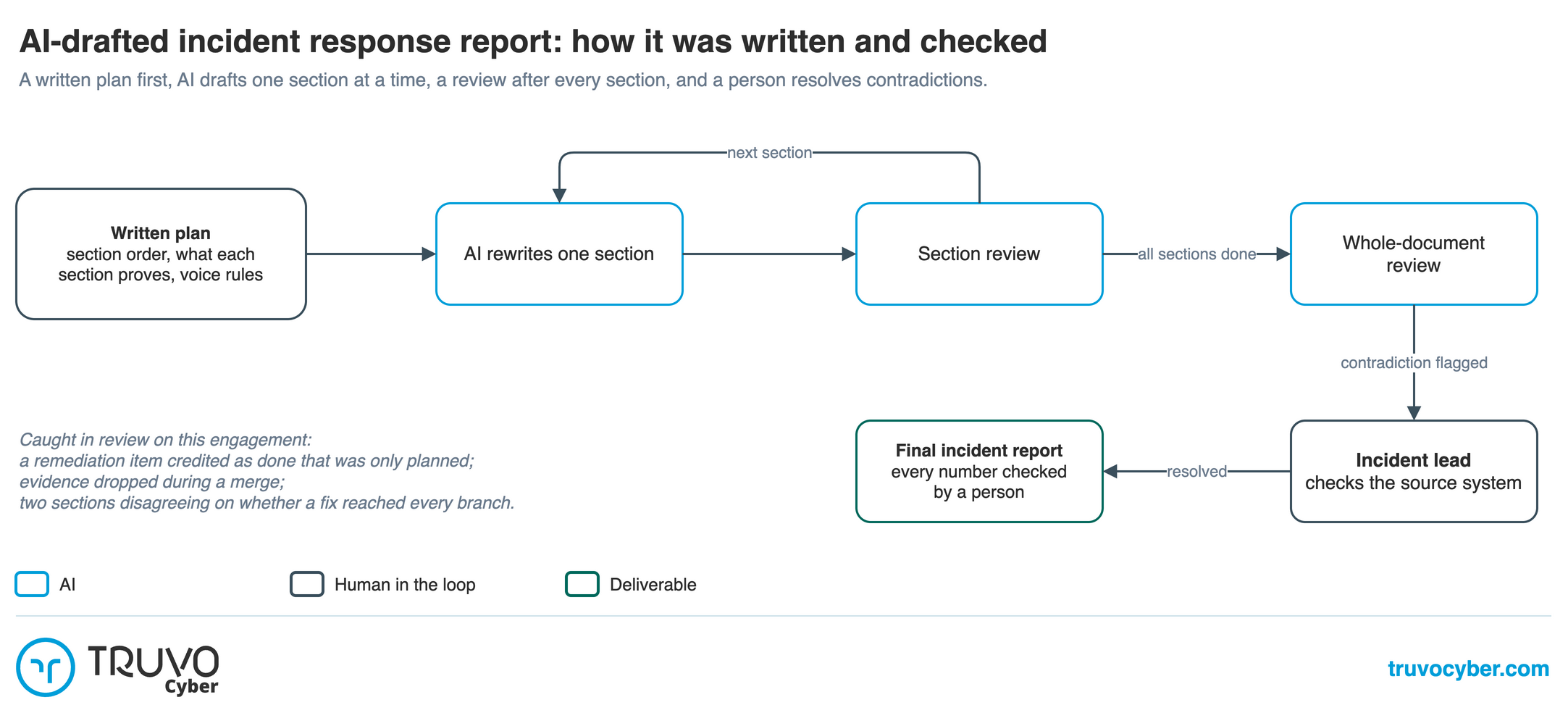
How AI was used. Before any drafting, we wrote a plan: the section order, what each section had to prove, and the voice rules. AI then drafted one section at a time, with a review after each section and a final review of the whole document.
What we learned. Reviews caught real errors before the client saw them:
- A remediation item credited as done when the evidence only showed it as planned
- Evidence that had been dropped when two people's edits were merged
- Two sections that disagreed on whether a fix had reached every code branch
The final review flagged that last contradiction and did not try to resolve it. Our incident lead checked it against the source system.
What people did. We decided what went into the report and what went into a separate lessons-learned roadmap. Listing planned work as finished in an incident report would have cost credibility.
Recovery: AI confirmed cleanup, people made the calls
Recovery restores normal operations and confirms nothing malicious remains.
How AI was used. AI wrote the read-only database queries that confirmed the malicious changes were gone from every affected record. Each query captured when and where it ran and stated the expected row count, so the output stood as evidence on its own.
What people did. Recovery decisions, and the retest of every fixed finding, stayed with people.
Lessons learned: recommendations drafted by AI, prioritized by people
The lessons-learned step turns the incident into improvements. AI drafted the recommendations from the findings. People decided which were urgent, which went into the incident report as completed, and which went onto the longer-term roadmap.
Practitioner's notes: using AI to write log-query scripts
AI-written query scripts were the biggest time saver of the engagement. These notes cover each kind of log source.
Web server access logs
The raw archives were large, so the script streamed each compressed file and kept only matching requests.
- Run the script across every archive and every existing extract, then merge. One early extract was incomplete, and merging all sources fixed the count with no new data from the client.
- Check what date a rotated log file covers. A file named for one day can hold the previous day's traffic.
Error tracking
The script pulled every event for each suspicious IP address across every issue in the project, and saved the raw JSON first.
- Search by IP address across all issues, not by endpoint. Related activity often lands under unrelated issue names.
- Error tracking can act as an accidental intrusion log: probing often throws errors. Successful malicious requests do not.
Edge network or CDN provider
The scripts queried firewall events and rules, and tested whether full request logs could be exported.
- An API error is a finding. A "forbidden" response on log export, or a short retention window, explains what can never be recovered. Put it in the report.
Production database
AI wrote read-only queries for the client's engineer to run.
- Make each query self-documenting: capture the timestamp, database, user and server in the output, and state the expected row count. A short result is then obvious.
Source control
Scripts traced when the vulnerable code first shipped and whether each fix reached every branch.
- Check branches, not commit messages. A fix on one branch is not a fix everywhere.
Rules for every AI-written query script
- Read-only credentials only, against systems the client approved
- Raw output saved next to every summary
- Timestamps converted to UTC inside the script
- Review effort spent on the output, since we did not read every script line by line
Key takeaways from using AI in incident response
- AI is fastest at the mechanical work. Writing log queries, correlating sources, building timelines and drafting reports were all much faster with AI.
- AI summaries need a challenger. They were often wrong when context or data was missing. Treat each one as a lead to verify.
- Both AI and people should read the raw output. A team that only reads AI summaries has no way to catch their mistakes.
- Read-only access is the safety net. It bounds the damage from a wrong script, so review effort can go into checking conclusions.
- Preparation sets the ceiling. AI cannot analyze logs that were never kept.
- Fixes need testing at the edges. AI-written fixes solve the stated problem; a person has to test the adjacent one.
- Decisions stay with people. Scope, severity, what goes in the report, and sign-off.
How to implement human-in-the-loop AI incident response
The steps below follow the NIST lifecycle: what to set up before an incident, how to run the response, and what to do after.
Before an incident (preparation)
- Ship logs off the server. Send web server, application and audit logs to central storage. Keep around 90 days searchable and archive for longer.
- Log successful requests, not only errors. Especially for authentication, authorization and configuration changes.
- Arrange read-only access paths in advance. Know how a responder gets read-only access to each log source, database and code repository.
- Check your provider plans. Confirm that your edge provider and other services let you export request logs, and for how long.
- Decide your AI rules for incident data. Agree which AI tools may process incident data and under what data-handling terms, before you need them.
During an incident (detection, analysis, containment, eradication, recovery)
- Open one engagement repository. Keep evidence, the analysis log, findings and drafts there as plain text under version control.
- Have AI write read-only queries per log source. Save raw output as evidence every time.
- Label every claim as reported or verified, with its source.
- Challenge every AI summary against the raw output. When a conclusion fails, ask a new question.
- Search for every instance of the root cause once it is known, and test each fix at its edges.
- Confirm cleanup with queries that document themselves.
After an incident (reporting and lessons learned)
- Write the report plan first, then let AI draft one section at a time.
- Review each section, then the whole document. Send contradictions to a person who checks the source system.
- Separate completed work from recommendations. The incident report states what is done and verified; the roadmap holds the rest.
- Feed lessons learned back into preparation, starting with any logging gaps the incident showed.
These steps also produce the evidence SOC 2 auditors look for under CC7.4 and CC7.5. Our posts on SOC 2 CC7.4 incident response and SOC 2 CC7.5 incident recovery cover the control side, and ISO 27001 A.8.15 logging covers log retention.
Will AI replace incident responders?
AI will not replace incident responders, on the evidence of this engagement.
AI replaced hours of querying, correlation and drafting. It did not replace scoping, challenging conclusions, judging context only the client had, confirming exploits, rating severity, or signing off on the report. Those steps decided whether the report was trusted.
Dealing with an incident, or want to be ready for one?
We run human-in-the-loop incident response and VAPT, and we'll tell you what we would check first.
Frequently asked questions about AI for incident response
What is human-in-the-loop incident response?
Human-in-the-loop incident response is an AI-enabled incident response where AI handles the mechanical work (log-query scripts, correlation, timeline building, report drafts) and a person challenges every AI summary against the raw evidence and makes every decision about scope, severity and what goes in the report.
How can AI be used in incident response?
AI is most useful for writing log-query scripts, correlating logs across sources, rebuilding the incident timeline, searching a codebase for every instance of the root-cause flaw, and drafting the incident report section by section. Each output still needs a person to check it against the raw evidence.
Where does AI fit in the NIST incident response lifecycle?
In NIST SP 800-61 Rev. 3, which models incident response on the CSF 2.0 Detect, Respond and Recover functions, AI fits best in Respond: incident analysis and drafting the incident report. Containment, eradication and recovery decisions, and preparation, stay with people. In SANS PICERL terms, most of the AI work sits in Identification.
Are AI summaries reliable during incident response?
AI summaries during incident response are often wrong when the AI lacks context or data, and they read just as confident either way. Treat each summary as a lead, check it against the raw output, and ask a new question when it fails.
Is AI code scanning enough after a security incident?
AI code scanning after a security incident is a good lead list and a poor final answer. It produces false positives, and in our engagement a manual, source-code-assisted penetration test still found further high-severity issues after the AI-assisted fixes were in.
What logs does AI need to help with incident response?
AI-assisted incident response needs web server, application and audit logs stored off the server, including successful requests, ideally with around 90 days searchable and a longer archive. Error-tracking tools alone miss successful malicious requests, because a request that works produces no error.
AI-enabled incident response is faster; the human in the loop keeps it accurate
AI made this engagement faster at almost every mechanical step. It also produced confident, wrong conclusions, it could not fill a logging gap, and it made none of the decisions the client relied on.
The incident report was trusted because a person traced every number in it back to the raw evidence.
If your team is dealing with an incident, or wants its logging and response process ready before one happens, book a call with Truvo Cyber. We'll tell you what we would check first.