
.svg)
OpenClaw is an open-source AI assistant that you host yourself and talk to through chat apps such as Slack, WhatsApp or Telegram. The OpenClaw software is free under the MIT license. You pay for the AI model and the machine that hosts OpenClaw. We installed OpenClaw 2026.10.7 in a macOS virtual machine in October 2026 to answer the questions below from first-hand use.
At a glance
- What: a self-hosted, always-on AI agent with a gateway, tools, memory and a built-in scheduler
- Where you talk to OpenClaw: chat apps (Slack, WhatsApp, Telegram, Signal, iMessage, Discord and others)
- Models: any provider
- License: MIT, source at github.com/openclaw/openclaw
- Former names: Clawdbot and Moltbot
- Our install: OpenClaw 2026.10.7 in a Lume macOS virtual machine on a Mac, reached through Slack DMs, with Gemini on Google Cloud Vertex AI as the model
- Sandboxing is off by default: the OpenClaw docs say so, and
openclaw sandbox explainon our install reportedmode: off
The headings below are the questions we asked while setting OpenClaw up, close to word for word.
What does OpenClaw do?
OpenClaw gives you one AI assistant that stays switched on, reaches you in your chat app, and can act on a schedule or on an event. A normal AI app waits until you open the app. OpenClaw can message you first.
The OpenClaw docs describe the product as Your AI assistant, on your own hardware, in every chat app you already use. One Gateway. Any model. Any device. In practice the main parts are:
| OpenClaw part | What the part does |
| Gateway | Always-on service that holds the config, sessions, credentials and policy, and connects to every chat channel |
| Channels | Where you talk to the assistant: Slack, Telegram, WhatsApp, Signal, iMessage, Discord and more |
| Tools | What the assistant can do: shell commands, files, web search and fetch, browser control, image and voice, messaging |
| Automations | The built-in scheduler: timed jobs and event hooks that wake the agent and deliver output to a chat |
| Memory and workspace | Files such as AGENTS.md and dated memory notes that carry context across days |
| Skills | Markdown instruction files that teach the agent how and when to use tools |
Typical uses include a morning briefing in Slack, a task captured from a chat message, a summary of an inbox, an alert when a webhook fires, or a coding agent started from a phone.
How does OpenClaw work? The gateway, the agent and the model
OpenClaw works as a gateway process on your machine that holds a connection to each chat app and passes messages to an agent, which calls an AI model and replies (see the OpenClaw architecture docs). The diagram below shows the setup from our lab: OpenClaw inside a Lume macOS virtual machine on a Mac, Slack as the chat app and Vertex AI as the model provider.
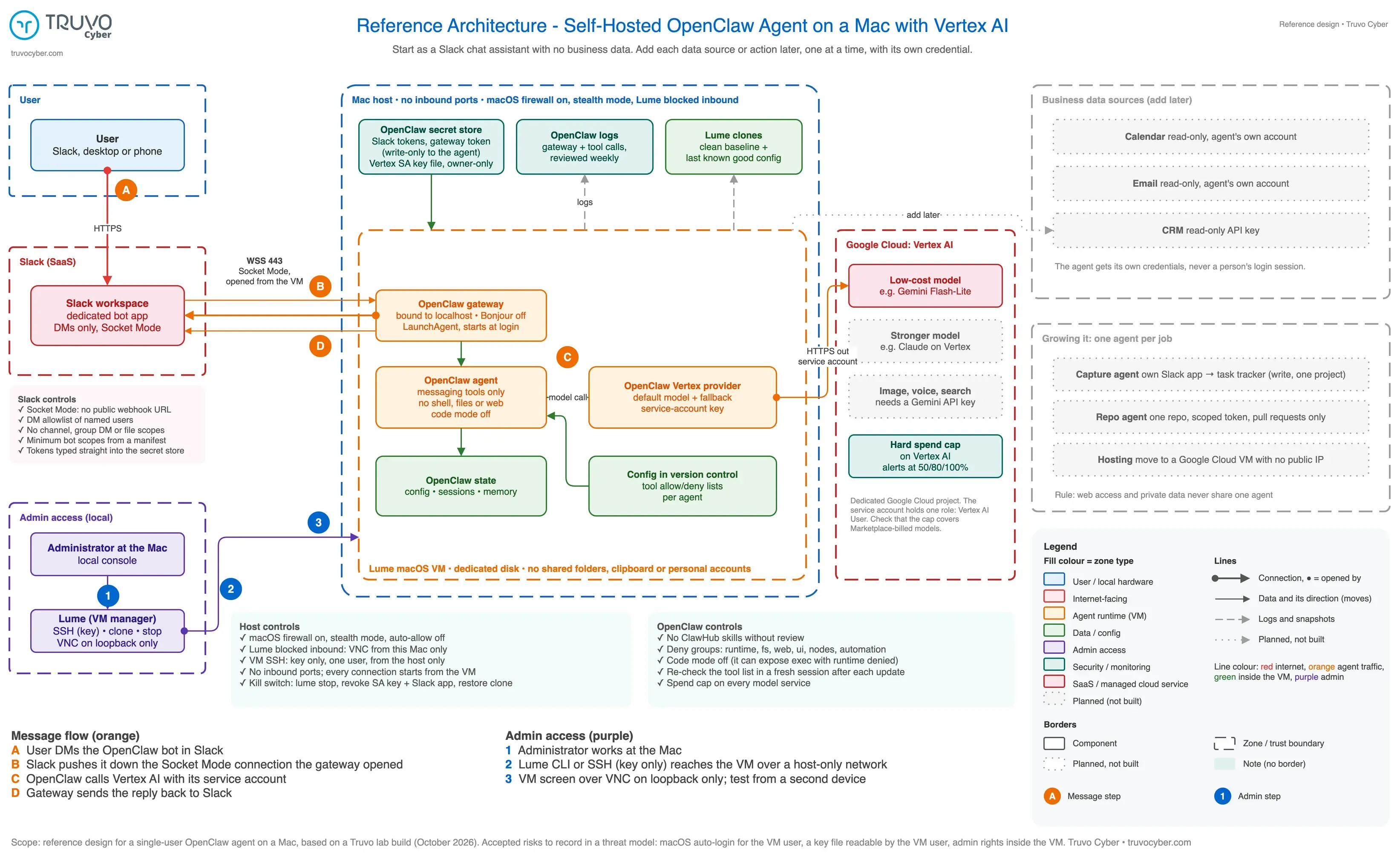
Figure: reference architecture for a self-hosted OpenClaw agent, with Slack Socket Mode in, Vertex AI out and no inbound ports on the Mac. Based on the Truvo OpenClaw lab, October 2026. Click the diagram to enlarge it.
In the diagram, the parts are grouped by trust zone. Slack and Google Cloud Vertex AI are outside services. The Mac host holds the Lume virtual machine, and the virtual machine holds the OpenClaw gateway, the OpenClaw agent, the OpenClaw secret store, logs and state.
Solid lines with a dot are network connections, and the dot marks the side that opens each connection. Every connection to an outside service starts from inside the virtual machine. Grey dotted boxes mark planned additions: a stronger model, image and voice tools, read-only calendar, email and CRM access, and separate agents for task capture and repository work.
A Slack message reaches OpenClaw in four steps:
- You send the OpenClaw bot a direct message in Slack.
- Slack pushes the message down a WebSocket connection that the OpenClaw gateway opened earlier (Slack calls this Socket Mode). The connection starts from inside the virtual machine, so the machine needs no open inbound port.
- The OpenClaw agent sends the conversation to the model on Vertex AI, using a Google Cloud service account that belongs to the agent.
- The gateway sends the reply back to Slack.
Key insight
OpenClaw on Slack Socket Mode needs no open inbound port
The OpenClaw gateway opens the Slack connection from inside the virtual machine and receives messages over that connection. The gateway itself listens on 127.0.0.1:18789 by default on a regular host, so only software on the same machine can reach the gateway directly.
On our first test, Vertex AI answered in about 1.2 seconds and the full agent turn took 12 seconds.
Is OpenClaw free? What the OpenClaw lab cost to run
The OpenClaw software is free, and the running costs are the AI model and the hardware. OpenClaw is MIT-licensed open source, and the OpenClaw docs state No paid tier. The costs we saw in the lab:
| Cost item | What we used |
| AI model | Gemini 3.1 Flash-Lite on Vertex AI: USD $0.25 per million input tokens and $1.50 per million output tokens on the global endpoint, standard tier, on Google’s pricing page, checked 2026-10-25 |
| Spend control | A hard monthly spend cap on Vertex AI in a dedicated Google Cloud project |
| Hardware | A Mac we already owned, with the virtual machine disk on an external SSD |
| Chat app | A Slack app on the existing workspace |
Two cost details came up during setup. Our new Google Cloud project started with a quota of zero for Claude models on Vertex AI, so the first Claude calls failed with a quota error until a quota request is approved. Image generation, voice and web search in OpenClaw go through a separate Gemini API key in this version, and the Vertex AI spend cap covers Vertex AI only.
How is OpenClaw different from MCP?
MCP (Model Context Protocol) is a standard way to plug a tool into an AI, and OpenClaw is an always-on assistant that can use those tools. An MCP server wraps one service, such as a calendar or a CRM, and offers actions an AI client can call. An MCP server does nothing alone. Something has to run the model, decide when to call the tools and talk to you.
OpenClaw is that something. OpenClaw acts as an MCP client, so a calendar or CRM connection for OpenClaw would typically be an MCP server under the same tool allow and deny rules as the built-in tools.
What can OpenClaw do without access to your accounts?
With no business accounts connected, OpenClaw is a chat assistant in Slack that can draft, summarize, remember and remind. Our lab agent has a model and a Slack DM and nothing else. The lab agent can:
- Draft and rewrite emails or posts from text you paste in.
- Summarize a document or a questionnaire you paste in.
- Keep notes across days, once the memory tools are allowed.
- Send reminders and check-ins, once the scheduling tool is allowed.
- Read screenshots and PDFs, once the Slack app has file permissions.
Calendar, email and CRM access each need a credential, and every credential widens what a manipulated agent could reach. We are adding calendar, email and CRM access one at a time, each with an account that belongs to the agent.
Why use OpenClaw when Claude has scheduled tasks?
OpenClaw earns a place when you want the assistant in your own chat app, using credentials issued to the agent, on infrastructure you control. Claude scheduled tasks cover much of the same ground with far less setup: Claude can do work on a schedule, and in Claude Code a scheduled task can also start from an API call or a GitHub event. xAI’s Grok Bot, in beta since August 2026, offers always-on agents that work in a cloud computer xAI provides. Our OpenClaw setup took several hours across two days.
The same comparison applies to most hosted agents:
| Question | Hosted agents (Claude scheduled tasks, Grok Bot) | Self-hosted OpenClaw |
| Who starts the work | You, a schedule, or vendor-supported triggers such as API calls and GitHub events | You, a schedule, a webhook or a message in any connected chat app |
| Where you talk to the assistant | The vendor’s apps | Your chat app: Slack, WhatsApp, Telegram and others |
| Whose credentials | Typically your own account connections | Accounts and keys issued to the agent |
| Which models | The vendor’s models | Any provider, billed to your own cloud account |
| Where the assistant runs | The vendor’s cloud | Your machine or your cloud project |
| Effort | Low | High: setup, patching and a review after each update |
Key insight
OpenClaw trades setup effort for control over credentials, models and hosting
Hosted agents such as Claude scheduled tasks need far less setup. Self-hosted OpenClaw suits teams that want the agent on their own infrastructure, with keys issued to the agent and any model provider.
Our verdict is open. We will decide after a 14-day trial of the morning briefing whether OpenClaw stays in our lab.
Is OpenClaw safe? What the OpenClaw defaults did in our lab
OpenClaw can be run safely, and a safe setup takes deliberate configuration. The OpenClaw docs say Sandboxing is off by default, openclaw sandbox explain on our install reported mode: off, and the project’s security policy describes OpenClaw as local-first agent infrastructure for trusted operators. Here is what we found and changed between 2026-10-23 and 2026-10-25:
| What we found | What we changed |
| A bare test run gave the model a shell tool, with about 40 other tools reachable through the shell | Tool profile set to messaging only, with the shell, file, web, browser and automation groups denied |
With no code mode setting, OpenClaw’s auto default switched code mode on for our Gemini model and gave the model an exec tool with the shell tools denied. The OpenClaw docs say this node:vm executor shares the Gateway process’s operating-system privileges |
Code mode turned off (tools.codeMode.enabled: false), then the tool list checked again in a fresh session |
| The gateway advertised itself on the local network over Bonjour | Bonjour plugin and mDNS discovery turned off |
| Lume’s VNC screen server answered on the Mac’s network address as well as on localhost, and Lume has no setting to change the listen address (an open Lume request, trycua/cua #3878, asks for one) | macOS firewall turned on in stealth mode, with Lume set to block incoming connections. A VNC connection from an iPad on the same network then failed |
| The Mac’s own firewall had never been switched on | Firewall on, automatic allow for signed software off |
| Slack’s highlighted app template for AI agents asks for more access than a DM bot needs | Slack app built from a manifest with five bot scopes and DMs only |
Watch out
OpenClaw sandboxing off becomes decisive once an agent gets a shell
Sandboxing off is harmless for a messaging-only agent, because a messaging-only agent has no commands to run. Once an OpenClaw agent gets a shell, the sandbox setting decides whether those commands can reach the agent’s own keys and tokens on the same machine.
OpenClaw’s GitHub repository listed 722 published security advisories on 2026-10-22. Researchers at Koi Security, reported by The Hacker News, found 341 malicious skills among 2,857 on the ClawHub skill registry in February 2026. Our lab installs no third-party skills.
The OpenClaw safe setup guide covers 10 security settings with the exact configuration for each. The agentic AI security architecture guide covers the controls that apply to any AI agent.
What our OpenClaw lab has not tested yet
Our OpenClaw lab is three days old, and several claims need more time before we make them. As of 2026-10-25 we have not tested:
- Prompt injection, such as an email that tries to make the agent leak data. The agent has no email access yet.
- Daily use over 14 days, and whether the briefing saves time.
- Claude models on Vertex AI, which wait on the quota request.
- A timed kill-switch drill that revokes every credential.
We will publish each result with the date and the OpenClaw version, starting with what changes when the agent gets a shell and a sandbox. To get each OpenClaw lab update by email, subscribe to the Truvo newsletter at the bottom of this page.
How to try OpenClaw on your own machine
A small first version of OpenClaw keeps the risk low and still shows what the assistant can do:
- Install OpenClaw in a virtual machine or a spare machine, with no shared folders and none of your personal accounts.
- Give the agent a dedicated model key in a separate cloud project, with a hard spend cap.
- Connect one chat app with DM-only permissions and an allowlist of named users.
- Turn on the messaging tool profile, deny shell, file and web tools, and turn off code mode.
- Confirm the gateway listens on localhost, then test from a second device that nothing on the machine answers on the network.
- Run
openclaw security audit(audit docs) and read every finding. - Add one data source at a time, each with a read-only credential issued to the agent.
OpenClaw rewards curiosity and careful defaults
OpenClaw is a fast way to see what an assistant looks like when the assistant lives in your chat app and acts without being asked. Installing OpenClaw shows the answer quickly. Securing OpenClaw takes longer, and the security work decides whether the assistant stays a useful tool or becomes a new way into company systems.
Truvo offers security architecture reviews that map what an agent can reach before the agent gets credentials, and AI penetration testing once the agent is live. For the next OpenClaw lab results, subscribe to the newsletter at the bottom of this page.
Map what your AI agent can reach
Fit AI agents into an effective security program before they touch company accounts.
Frequently asked questions about OpenClaw
What is OpenClaw used for?
OpenClaw is used as an always-on personal or team assistant reached through chat apps. Typical uses include morning briefings, capturing tasks from chat messages, inbox summaries, alerts when a webhook fires, and starting coding agents from a phone. Each use needs the right tools and credentials turned on.
Is OpenClaw free?
The OpenClaw software is free under the MIT license. Running OpenClaw costs money for the AI model and the machine that hosts the gateway. In our October 2026 lab, Gemini 3.1 Flash-Lite on Vertex AI was priced at USD $0.25 per million input tokens and $1.50 per million output tokens.
Who makes OpenClaw?
OpenClaw is developed in the open by the OpenClaw Foundation, which the OpenClaw docs describe as an independent 501(c)(3). The source is at github.com/openclaw/openclaw under the MIT license. The project was previously known as Clawdbot and Moltbot, according to the NVD entry for CVE-2026-25253.
Can OpenClaw run on Linux or in the cloud?
OpenClaw runs on macOS, Linux and in containers, and the OpenClaw docs include a Google Cloud install guide. Our lab uses a macOS virtual machine on a Mac. On container hosts the docs list the default bind as auto, so check that the gateway listens on localhost before connecting anything.
Is OpenClaw safe to install?
OpenClaw can be installed safely with deliberate configuration. In our lab the OpenClaw defaults gave the model a shell and advertised the gateway on the local network, and the Mac's firewall had never been switched on. A safe start uses a virtual machine, an agent-owned model key, DM-only chat access, denied shell and file tools, and no third-party skills.
How is OpenClaw different from MCP?
MCP is a protocol for connecting tools to an AI. OpenClaw is an always-on assistant that runs a model, talks to you in chat apps and uses tools, including MCP servers. A team could use MCP connectors with many AI apps, while OpenClaw adds the always-on gateway, chat channels and scheduler.