


In cybersecurity, what you don’t know can hurt you. An unmonitored system is a black box where attackers can operate undetected for weeks or months. Comprehensive logging and monitoring are the foundational practices that turn this black box into a glass box, providing the visibility needed to detect threats, respond to incidents, and prove compliance.
For engineers and system administrators, implementing logging is often seen as a routine task. However, building a strategy that is resilient, comprehensive, and truly useful for security requires a deeper architectural approach, the kind a security architecture consulting engagement brings. This isn’t just about collecting logs; it’s about collecting the right logs, ensuring their integrity, and turning them into actionable intelligence.
From a compliance perspective, logging is non-negotiable. Frameworks like SOC 2 and ISO 27001 have explicit requirements for event logging, monitoring, and incident response. Auditors will look for evidence that you not only generate logs but also review them and act upon the information they provide. A mature logging strategy is a direct path to satisfying dozens of security controls.
This article provides a practical framework for designing and implementing a robust logging and monitoring architecture for a modern cloud-native application, covering everything from endpoints and servers to SaaS platforms and the centralized systems that bring it all together.
The Core Security Goals of Logging
Before designing an architecture, it’s crucial to understand the primary security functions that a logging framework must support. These goals are the “why” behind the entire effort and drive your architectural decisions.
- Security Monitoring & Incident Detection: Identify suspicious activity in real time by analyzing log streams for threat patterns, such as repeated failed login attempts or unusual network traffic.
- Incident Response & Investigation: Logs provide detailed records of events, allowing analysts to confirm incidents, determine their scope, and contain them effectively.
- Forensics & Root Cause Analysis: Historical log analysis reveals how an attacker gained access and which vulnerabilities were exploited, enabling stronger defenses.
The Three Pillars of an Effective Logging Strategy
A successful logging strategy rests on three core pillars that define the lifecycle of log data—from creation to actionable intelligence.
- Log Generation: Configure all components (endpoints, servers, cloud, SaaS) to produce accurate and detailed logs.
- Log Shipping and Centralization: Securely transport logs to a central, tamper-resistant location for analysis.
- Detection and Monitoring: Analyze centralized data for threats, alerts, and forensic investigations while ensuring log sources report correctly.
Architecting Log Generation: What to Log and Where
Default logging isn’t enough. Ensure comprehensive telemetry collection and time synchronization across all components using NTP to correlate events effectively.
Set log settings from the CIS Benchmarks logging recommendations for each OS and platform. Collect and ship security-relevant events only: authentication, authorization, privilege changes and configuration changes. Shipping everything raises SIEM cost and buries security events in noise.
End-User Workstations (Endpoints)
- Operating System Logs: Follow CIS Benchmarks. Use Sysmon for detailed process and network activity.
- Security Tool Logs: Collect logs from EDR or antimalware tools showing threats and actions taken.
- DNS & Network Logs: Monitor queries and network connections for signs of malicious activity.
Servers and Applications
- Operating System Logs: Capture authentication events, privilege escalations, and configuration changes.
- Web Server Logs: Ship security-relevant events only, such as authentication and authorization failures and requests to admin paths.
- Application Logs: Include authentication events, account changes, privilege escalations, and critical business actions.
Orchestration Environments (e.g., Kubernetes)
- API Server Audit Logs: Record all API requests and administrative actions.
- Container Runtime Logs: Forward security-relevant events from container output, such as authentication and authorization events.
- Node-Level Logs: Monitor system health and configuration at the node level.
SaaS Platforms
- Audit Log Capabilities: Verify detailed tracking of user activity.
- API Access: Pull logs programmatically into your central system.
- Tiered Logging: Use enterprise-tier audit logs for critical systems.
Centralized Log Management: Building a Resilient Architecture
Logs must be centralized in a resilient, secure architecture—typically through log-shipping agents feeding a Security Information and Event Management (SIEM) platform. On on-prem and colocation servers, no cloud provider collects logs for you, so your team installs and monitors these agents, and auditors sample their output as evidence. We set up that pipeline with clients in our SOC 2 for on-prem and colocation engagements.
Designing logging to satisfy a SOC 2 or ISO 27001 audit?
Talk to a Security ArchitectResiliency: A Critical Non-Functional Requirement
- Detecting Silence: Alert if a source stops sending logs.
- Handling Network Outages: Keep about 30 days of logs on each agent and retry until delivered, so nothing is lost if the network or the integration breaks.
- Collector Availability: Deploy central collectors with high availability.
The diagram below traces security events from source to alert: which events each source sends, how agents protect against outages, where logs are stored, and how detections are validated.
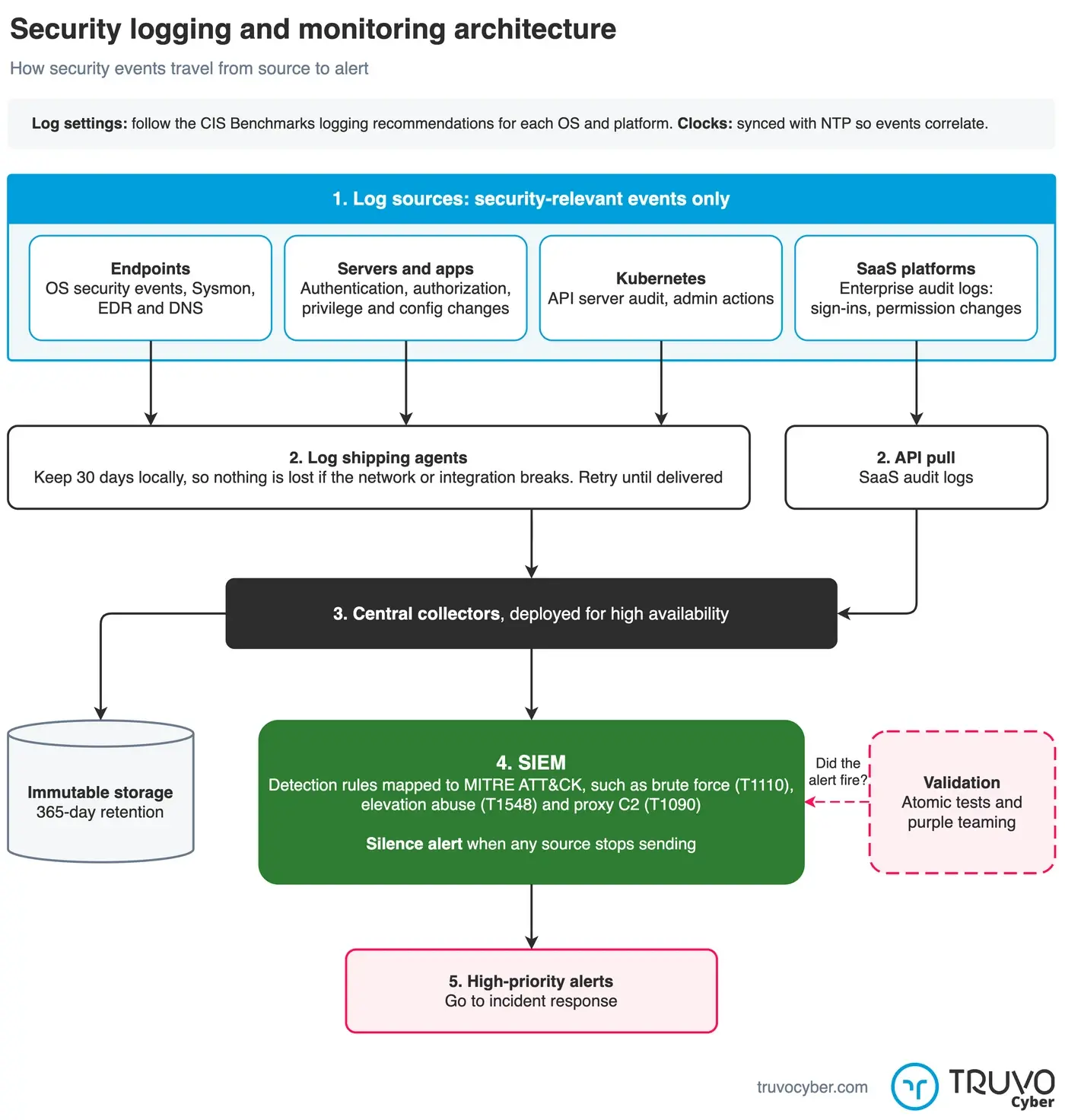
Collect only security-relevant events, keep 30 days on the agent, and prove alerts fire end to end. Click to enlarge.
Verification: From Logs to Detections
Define, test, and validate your detection rules to ensure your logging pipeline works end-to-end.
Defining Detection Use Cases
Examples of MITRE ATT&CK–aligned detections:
| Tactic | Technique (ID) | Detection Log Sources |
|---|---|---|
| Credential Access | Brute Force (T1110) | Application logs, WAF logs, firewall logs |
| Privilege Escalation | Abuse Elevation Control Mechanism (T1548) | Windows Event Logs, Sysmon |
| Command and Control | Proxy (T1090) | DNS and network flow logs |
Testing and Validation
- Atomic Tests: Validate log and alert flow for specific actions.
- Penetration Testing & Purple Teaming: Simulate attacks to confirm end-to-end visibility.
Requirements Mapping Example
Define and document operational, threat, and non-functional logging requirements.
| Requirement Category | Requirement ID | Description |
|---|---|---|
| Operational (OFR) | OFR-LOG-01 | Implement centralized, highly available log management. |
| OFR-LOG-02 | Ensure agents cache logs locally during network issues. | |
| OFR-LOG-03 | Configure SIEM to alert on high-priority detections. | |
| Threat (TFR) | TFR-LOG-01 | Monitor failed login attempts for brute-force detection. |
| TFR-LOG-02 | Analyze DNS queries for known malicious domains. | |
| Non-Functional (NFR) | NFR-LOG-01 | Retain immutable security logs for at least 365 days. |
| NFR-LOG-02 | Maintain 99.9% logging pipeline availability. |
Compliance Framework Mapping
These practices align with SOC 2 and ISO 27001 requirements:
| Implementation Task | SOC 2 Trust Services Criteria | ISO 27001:2022 Annex A |
|---|---|---|
| Deploy centralized logging and SIEM | CC7.2: Monitoring for anomalies and malicious acts | A.8.16: Monitoring activities |
| Develop detection rules | CC7.3: Evaluate and act on security events | A.5.7: Threat intelligence |
| Integrate logging with incident response | CC7.4: Execute incident-response programs | A.5.26: Management of information security incidents |
| Generate and retain audit logs | CC6.1: Logical access security | A.8.15: Logging |
Conclusion
A robust logging and monitoring strategy is a cornerstone of cybersecurity. By designing systems for comprehensive visibility and using that data to detect and respond to threats, organizations strengthen defenses and align with key frameworks like SOC 2 and ISO 27001.
Frequently Asked Questions
What logging is required for SOC 2 compliance?
SOC 2 does not list log sources. CC7.2 asks you to monitor system components for anomalies, and auditors test that the logs behind that monitoring exist. The usual minimum set:
- Sign-in and access events from the identity provider
- Admin actions in cloud consoles and SaaS platforms
- Security events from production servers, databases and applications
- Firewall, VPN and DNS logs
- Deployments and configuration changes to production
Logs flow to one central store with restricted access, and alerts route to a ticket queue or on-call channel. The SOC 2 CC7.2 monitoring guide covers log retention.
What is the difference between logging and monitoring?
Logging records events: who signed in, what changed, which request failed. Monitoring reviews those records through detection rules, alerts and dashboards, and sends findings to someone who acts on them. SOC 2 CC7.2 and ISO 27001 A.8.16 test monitoring. ISO 27001 A.8.15 covers the logs.
Which ISO 27001 controls cover logging and monitoring?
Two Annex A controls. A.8.15 covers producing, storing, protecting and analyzing logs, and the ISO 27001 logging requirements guide covers implementation and evidence. A.8.16 covers monitoring activities across networks, systems and applications.