
.svg)
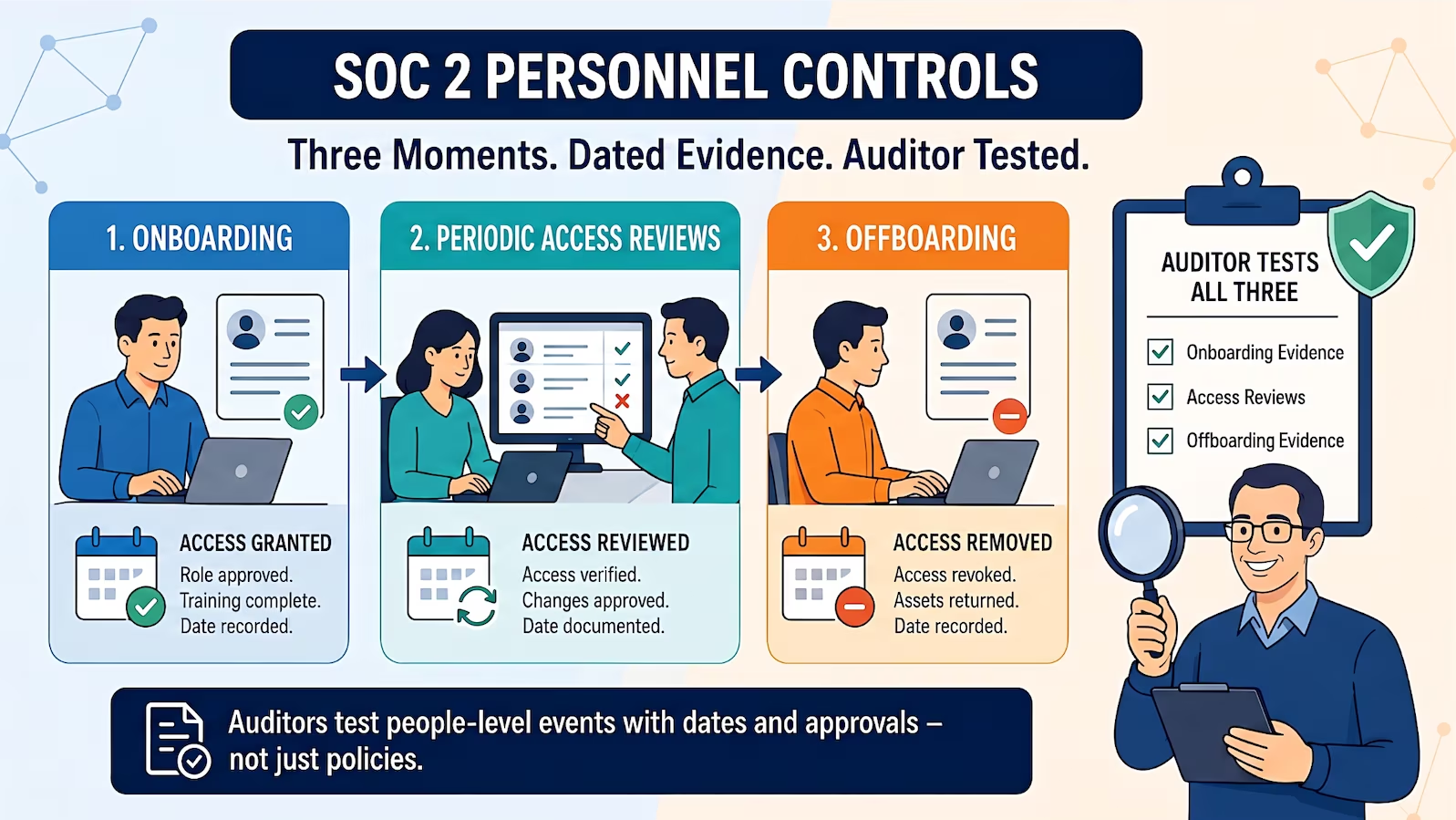
SOC 2 personnel controls come down to three moments: onboarding on day one, the periodic user access review that confirms access still matches the job, and offboarding on the day someone leaves. Auditors test all three against dated evidence, and a single contractor whose access survived their contract end date can turn into an exception on your report that enterprise buyers will ask about.
The process below is tooling-agnostic. It works the same whether you run it from a GRC platform or a spreadsheet, and it starts with a decision most teams skip: which people are in your audit at all.
Which Trust Services Criteria Cover Personnel
Personnel access spans several criteria, and knowing which one drives which control keeps your evidence organized:
| Criterion | What it asks | Personnel control |
| CC1.4 / CC1.5 | Does the organization hire competent people and hold them accountable? | Background checks, job descriptions, policy acknowledgment |
| CC6.1 | Are logical access controls in place over protected assets? | RBAC, authentication, least privilege design |
| CC6.2 | Are users registered, authorized before access, and removed when no longer needed? | Provisioning approvals, deprovisioning on exit |
| CC6.3 | Is access modified or removed based on role changes, considering least privilege and segregation of duties? | User access reviews, role-change reprovisioning |
We have published deeper breakdowns of the access criteria; start with CC6.1 logical access security for how auditors evaluate the design of your access model. This post covers the people process that sits on top of it.
Scoping: Who Counts as Personnel in Your Audit
Scope decisions made in week one determine how much evidence you collect for the next year. Your auditor needs an unambiguous answer to who is in scope, and the answer follows access, not employment status. The same logic that scopes systems applies here; we cover the full method in SOC 2 scoping: systems, people, and processes.
- In-scope employees: anyone who touches production systems, customer data, or the infrastructure and code that serve them. Engineering, support with admin consoles, DevOps, and usually finance staff with billing-system access.
- In-scope contractors: contractors acting as an extension of your team, such as a contract developer with commit access or a fractional sysadmin, get tested exactly like employees. Same onboarding, same reviews, same offboarding.
- Vendors: third-party organizations providing a service (your cloud provider, your CRM) fall under vendor risk management (CC9.2) instead, where you rely on their attestations. Our guide to SOC 2 vendor management covers that track.
- Out-of-scope personnel: people with no access to in-scope systems or data. Excluding them is legitimate and shrinks your evidence burden, but document the rationale, because auditors verify scoping decisions rather than accepting them.
Write the exclusion down
A one-page scoping memo listing who is out of scope and why (no production access, no customer data access) takes an hour to write and removes an entire line of auditor questioning. Undocumented exclusions read as oversights.
Onboarding: The Evidence Auditors Sample
In a Type 2 audit, the auditor pulls a sample of people hired during the observation period and asks for the artifacts below, for each person, dated before or at access grant. A policy with no dated artifacts behind it fails the test.
- Background check: a completion record (or documented screening decision) dated before access to sensitive systems. Scope the check to the role's risk and your policy, and apply it consistently: an inconsistent practice is worse than a modest one.
- Policy acknowledgment: a signed or electronically recorded acceptance of your acceptable use and information security policies, with a timestamp. A PDF sitting in a shared drive with no acknowledgment record fails the test.
- Security awareness training: a completion record at hire and annually after. Keep the report exportable per person; auditors sample individuals, not aggregates.
- Access request and approval: a ticket, form, or workflow entry showing who requested the access, who approved it, and what was granted. Access that appears in a system with no corresponding approval is the finding auditors write up most readily under CC6.2.
Watch the status-change edge case. A contractor converting to full-time, or anyone moving into a higher-access role, needs the onboarding steps their new status requires, even after months on the team. Auditors treat a role change as a new access decision under CC6.3, and the missing artifact is usually the updated background check or the re-approval of expanded access. Companies without automated provisioning feel this hardest; we wrote a dedicated guide to SOC 2 HR security without auto-provisioning for that situation.
RBAC: Make Reviews Reviewable
Role-based access control pays off most at review time. When permissions map to a handful of defined roles (developer, support analyst, finance admin), an access review asks one question per person: does this role still match this job? Without roles, the reviewer faces hundreds of individual permission grants nobody remembers approving, and the review degrades into rubber-stamping.
Three practices keep RBAC audit-ready:
- Document each role's permission set in a place auditors can read, and treat changes to a role as changes to every holder's access.
- Handle exceptions explicitly. When someone needs access outside their role, grant it with an expiry date and a recorded approval rather than widening the role for everyone.
- Review the roles themselves annually. Roles drift as the product grows; a role review catches permissions that no current job function needs.
User Access Reviews: Cadence and Execution
The user access review (UAR) validates that everyone's access still matches their current role. A defensible cadence for a SaaS company: quarterly for critical systems (production infrastructure, source control, customer data stores, financial systems) and semi-annually for lower-risk applications. Auditors accept a risk-based cadence as long as your access control policy states it and your evidence shows you followed it. The review itself is tested under CC6.3; any removals it triggers are tested as deprovisioning under CC6.2.
A review that holds up in an audit has four parts:
- A dated user list pulled from each system, not from memory or a stale spreadsheet. The export itself is evidence.
- A named reviewer with real knowledge: the engineering manager reviews production access, not the compliance coordinator who cannot judge whether a permission is needed.
- A recorded disposition for every account: keep, modify, or remove, including service accounts and dormant accounts, which are where stale access hides.
- Closed-loop remediation: a ticket showing each flagged access was removed, with a date. A review that finds stale access and never removes it is worse in an auditor's eyes than finding nothing, because it documents a known, unaddressed gap.
The rubber-stamp trap
A UAR where every reviewer approves every line in minutes, quarter after quarter, tells the auditor the control exists on paper only. Reviews that occasionally find and remove access are the ones that demonstrate the control operates.
Offboarding: The Deadline That Gets Tested
Offboarding is where personnel controls most often fail an audit, because it depends on a handoff between HR and engineering that nobody owns. Set an explicit standard in your policy, commonly same business day for critical systems and within 24 hours for everything else. Then build a checklist per departure: identity provider disabled first (which kills SSO-connected apps at once), then non-SSO applications, shared credentials rotated, tokens and keys revoked, devices recovered.
In a Type 2 audit, the auditor takes the list of everyone who left during the observation period and compares termination dates against access-removal timestamps. Gaps of days, especially for contractors whose end dates were never communicated to engineering, become exceptions on the report. Contractors deserve extra attention: put access end dates in the contract and set calendar-driven deprovisioning rather than waiting for someone to remember.
Why buyers read this section of your report
Enterprise security teams reviewing your SOC 2 report look at access-control exceptions first, because offboarding failures map directly to the insider-risk questions on their own questionnaires. A clean personnel section shortens security review, and that shortens your sales cycle.
Automating the Lifecycle Without Losing the Control
The process above is tooling-agnostic, and that is the right way to design it: define the control first, then automate it. GRC platforms such as Vanta, Drata, and Secureframe connect to your HRIS and identity provider to sync personnel lists, chase training and policy acknowledgments, run UAR campaigns with reminders and audit-ready exports, and alert on terminated employees with live accounts.
The automation is worth having; the failure mode is treating it as the control. A platform can confirm an account was disabled, but it cannot decide whether a support analyst still needs production database access, and it will not catch the contractor added directly to a system outside your identity provider. Judgment calls and unintegrated systems stay on your team either way; we cover the boundary in detail in what Vanta and Drata cannot automate.
Sequence matters more than software. Personnel access is one of the security capabilities that make up an effective program: build the capability, and the SOC 2 evidence follows as a byproduct. Teams that get the process right often find the audit itself compresses; a focused build can reach a SOC 2 Type 1 in 90 days, and the personnel controls carry straight into the Type 2 observation period.
Personnel Controls Slowing Your Audit?
We design access lifecycles as part of an effective security program, so SOC 2 evidence collects itself.
The SOC 2 User Access Review Checklist
Personnel access lifecycle, end to end
- Scoping memo naming in-scope personnel groups and documenting exclusions
- Onboarding artifacts per hire: background check, policy acknowledgment, training record, approved access request
- Role change treated as a new access decision, with re-approval on record
- RBAC with documented roles, expiring exceptions, and an annual role review
- UARs quarterly for critical systems, semi-annually elsewhere, with dispositions and closed remediation tickets
- Offboarding SLA in policy, identity provider first, contractor end dates calendar-driven
- Automation for evidence collection, human judgment for access decisions
Each artifact on that list is also an answer to a security questionnaire question you would otherwise write by hand during a deal. Personnel controls built once serve the audit, the enterprise sales process, and every renewal after it.
Frequently Asked Questions
How often should user access reviews be done for SOC 2?
SOC 2 does not mandate a fixed frequency. A common, auditor-accepted pattern is quarterly reviews for critical systems (production, source control, customer data, financial systems) and semi-annual reviews for lower-risk applications. Whatever cadence you choose, state it in your access control policy and keep dated evidence that you followed it.
Are contractors in scope for a SOC 2 audit?
Contractors who work as an extension of your team with direct access to in-scope systems, such as a contract developer with commit access, are in scope and tested like employees. Third-party organizations providing a service are handled under vendor risk management (CC9.2), where you rely on their own attestations instead.
What evidence do auditors ask for on employee onboarding?
For a sample of people hired during the audit period, auditors typically request the background check record, a timestamped acknowledgment of security policies, a security awareness training completion record, and the approved access request showing who authorized the access granted. Each artifact needs a date that lines up with the access grant.
How fast does access need to be removed when someone leaves?
SOC 2 requires timely removal under CC6.2 but does not define a number of hours. Same business day for critical systems and within 24 hours for everything else is a common policy standard. In a Type 2 audit, the auditor compares termination dates against access-removal timestamps for everyone who left during the observation period.
Which SOC 2 criteria cover onboarding, offboarding, and access reviews?
CC1.4 and CC1.5 cover hiring competent people and accountability (background checks, policy acknowledgment). CC6.1 covers the design of logical access controls. CC6.2 covers registering and authorizing users before access and removing access when no longer required. CC6.3 covers modifying or removing access on role changes, which is where user access reviews sit.
Can a GRC platform run access reviews for me?
Platforms like Vanta, Drata, and Secureframe automate the mechanics: syncing user lists, launching review campaigns, chasing reviewers, and exporting audit-ready evidence. The access decisions themselves, whether a given person still needs a given permission, remain human judgment, and systems outside your identity provider still need manual review.
Ready to Build Your SOC 2 Roadmap?
Our free, no-obligation assessment will give you a clear, actionable plan to achieve compliance.
Contact Us
Sample SOC 2 Control List
Input your email to download the list.
About the Author

Former security architect for Bank of Canada and Payments Canada. 20+ years building compliance programs for critical infrastructure.