
.svg)
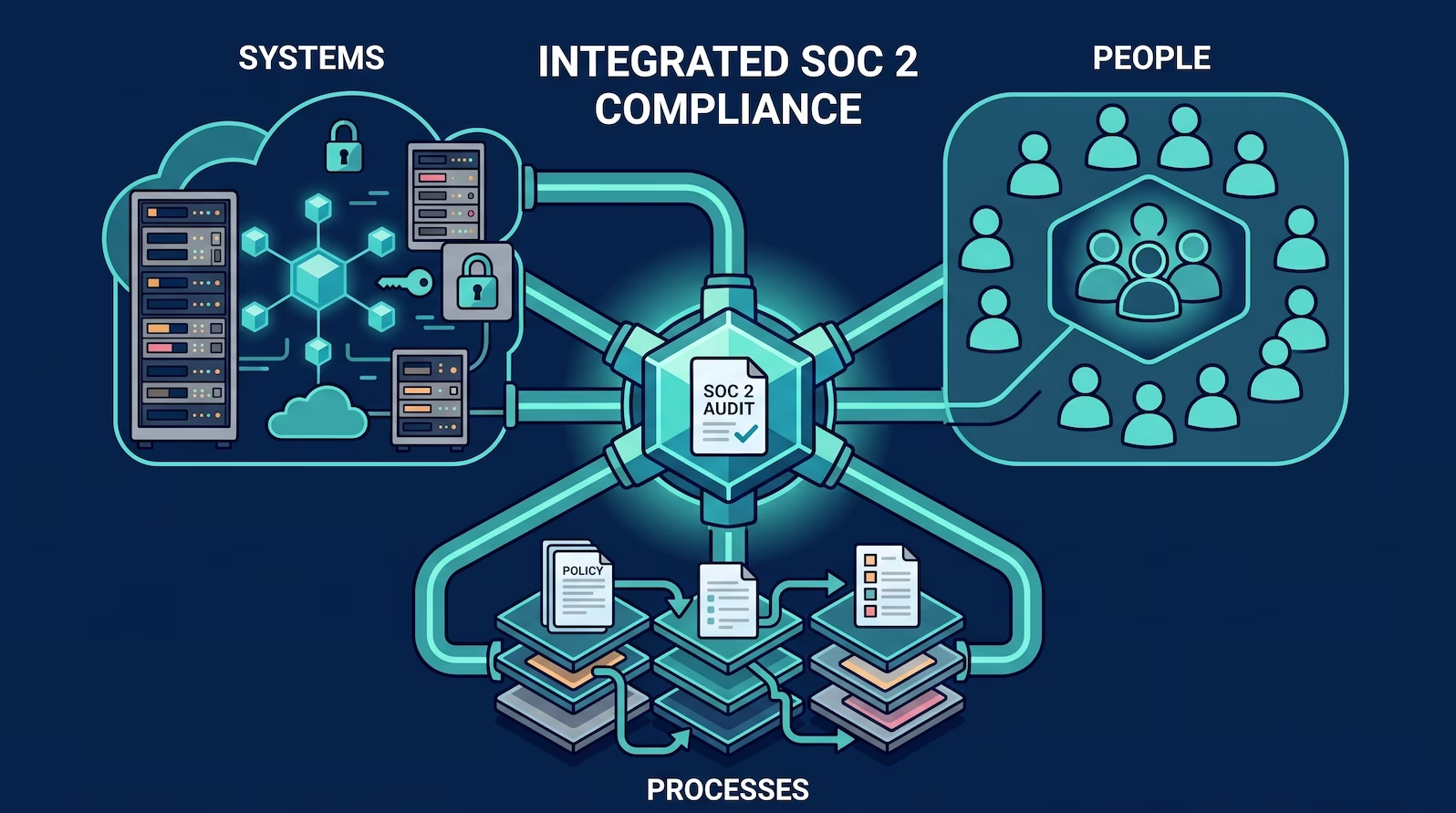
Most SOC 2 guides treat scope as a single question: what systems are we certifying? That is one third of the answer.
SOC 2 scope has three dimensions:
-
systems (the technology stack and infrastructure)
-
people (employees, contractors, and subservice organizations)
-
processes (the policies and procedures that govern how the service operates)
First-time audits can go sideways because the company over-scoped one dimension, under-scoped another, or discovered the disconnect only when the auditor started asking questions.
This guide covers all three dimensions, how they interact with the Trust Services Categories you choose, and how to document scope in a way that gives auditors what they need on day one.
The Three-Dimension Scope Model
Most compliance teams define scope once, around systems. Getting scope right means defining it across all three dimensions before any controls work starts, not after the auditor has already begun sampling.
What SOC 2 Scope Means
SOC 2 is issued under the AICPA's Trust Services Criteria. The audit is not a blanket assessment of the company's security; it is an assessment of a specific service and whether the controls protecting that service meet the criteria being evaluated.
That service is described in the System Description, a formal document at the front of the SOC 2 report. The System Description answers: what does this service do, what systems support it, who has access to it, how is it operated, and what controls are in place? Everything in scope needs to appear in that description with controls mapped to it. Everything out of scope requires no audit evidence.
The auditor's job is to test whether controls were designed appropriately and, for a Type 2 audit, whether they operated effectively over the audit period. They can only test what falls inside the scope boundary. That means scope decisions have direct consequences: how much evidence needs to be collected, how many people are subject to access reviews, and how many systems need to meet configuration baselines.
Define scope too broadly and the team is doing compliance work for systems and people that don't require it. Define it too narrowly and the auditor finds gaps that weren't disclosed, which creates problems that survive into the audit opinion.
Dimension 1: Systems
The systems dimension covers every component of the technical stack that supports the in-scope service: production infrastructure, application code, data stores, cloud provider accounts, networking, and third-party integrations that handle production data.
For a typical SaaS application, the in-scope system includes:
- Production cloud accounts and regions (AWS, GCP, Azure, or equivalents)
- Application servers and managed services (compute, containers, serverless functions)
- Databases and storage that hold customer data
- Identity and access management infrastructure (IdP, SSO, MFA enforcement)
- Logging and monitoring infrastructure (SIEM, CloudTrail, audit logs)
- CI/CD pipeline components with production deployment access
- Networks and firewalls governing production traffic
- Email and productivity tools: M365, Google Workspace etc.
Development and test environments
Can be excluded if genuinely isolated: no production data in test, no shared credentials between environments, no developer access paths into production through dev tooling. If developers use the same credentials to access dev and production, the environments aren't isolated and the carve-out won't hold under audit scrutiny.
Backup and disaster recovery
Typically in scope because they contain copies of production data. Excluding them when entirely operated by a third party shifts the documentation burden toward demonstrating the third party's controls rather than eliminating it.
Internal tooling, HR, finance, and marketing platforms
Out of scope by default if there is no access path to the in-scope service's data or infrastructure. The practical question for any system: can it access, modify, or disrupt production data or the production environment? If no, it is a candidate for exclusion.
Dimension 2: People
People scoping is where companies consistently over-scope. The default assumption is that SOC 2 applies to the entire company. For most SaaS businesses, that is not correct.
SOC 2's people controls focus on who has access to in-scope systems and data. CC6.1 addresses logical and physical access to systems; CC6.2 covers periodic access reviews. Both criteria are scoped to the in-scope system, not to the organization as a whole.
The Compliance Population Is Not the Whole Company
A 50-person company where 10 engineers operate the product does not need to run endpoint management, access reviews, or user-specific audit testing on the remaining 40 people. The compliance population is 10, not 50. Over-scoping people adds evidence burden with no audit benefit.
What applies company-wide:
- Policy acceptance (security policy, acceptable use, confidentiality agreements)
- Security awareness training
- Background checks at hire
These apply organization-wide because they represent baseline commitments about every person under the company's roof, regardless of what systems they access.
What is limited to the in-scope population:
- Device management and endpoint compliance (only devices that access in-scope systems need to meet the configuration baseline)
- Access reviews (only accounts with production or sensitive data access are sampled)
- User-specific audit testing (the auditor samples from people who are material to the in-scope service)
The mechanism for drawing the boundary:
The cleanest way to enforce this distinction is through identity groups in the IdP. Separating the product team from the rest of the organization in a group or directory that maps to the compliance population creates an auditable boundary: users in the group are subject to the full control set, users outside it are excluded from device management, access reviews, and user-level testing.
Group membership needs to be enforced, not just documented. If someone outside the compliance group can still request production access through an informal channel, the boundary doesn't hold. Auditors look at whether the boundary is technical and demonstrable, not whether it's described in a policy. For a deeper treatment of people scoping across different organizational structures, see our post on SOC 2 people scoping.
Subservice organizations:
Subservice organizations are third parties that perform functions material to the service: cloud infrastructure providers, database-as-a-service vendors, CDNs. They appear in the System Description because their controls are part of the overall control environment.
There are two ways to treat them. Under the carve-out method, the report notes that the subservice organization performs certain functions but excludes their controls from the audit scope. The reader is directed to the subservice organization's own SOC 2 report for those controls. Under the inclusive method, the subservice organization's controls are included in the audit scope, which means the auditor tests them directly. The inclusive method is rare because it requires cooperation and access from a third party and is unnecessary when they publish their own Type 2 report.
AWS, GCP, Azure, and most major infrastructure providers publish Type 2 reports. When using the carve-out method, the company obtains those reports, notes in the System Description that AWS operates the infrastructure under a carve-out arrangement, and directs relying parties to review AWS's own SOC 2 report alongside the company's. No additional testing is required.
Dimension 3: Processes
Process scope covers the policies and procedures that must be formally documented, maintained, and evidenced as operating during the audit period.
The misconception is that in-scope processes means every operational procedure the company runs. It doesn't. It means the formal governance commitments that auditors test: policies that define what the company does, procedures that describe how it gets done, and controls that demonstrate it happened.
For a baseline SOC 2 audit against the Security criteria (CC1 through CC9), the in-scope processes typically include:
- Access management: how access is granted, reviewed, modified, and revoked (CC6.1, CC6.2)
- Change management: how changes to the production environment are reviewed, approved, and tracked (CC8.1)
- Risk management: how risks are identified, assessed, and monitored over time (CC3.2, CC4.1)
- Incident response: how security incidents are detected, contained, and resolved (CC7.3, CC7.4)
- Vendor management: how third-party risk is assessed and tracked (CC9.2)
- Business continuity: how the service recovers from disruptions (A1.2, if Availability is in scope)
- Security monitoring: how the environment is watched for threats and anomalies (CC7.1)
Each of these requires a governing policy that states the company's commitments, plus evidence that those commitments were followed during the audit period. The policy is the what. The evidence is the proof it happened.
Policies vs. Procedures: Keep Them Separate
Policies state the company's commitments. Procedures describe how to carry them out. When system-specific steps and dashboard instructions live inside a policy document, every infrastructure change triggers a formal policy update with acknowledgment cycles. Keeping them separate means procedures can evolve as the environment changes without requiring a full policy review cycle.
Trust Services Categories: How They Shape Scope
The Security category (the Common Criteria, CC1-CC9) is the only mandatory category for a SOC 2 report. All other Trust Services Categories are optional, and each one added expands the scope of what auditors assess.
| Category | What it covers | When to add it |
| Security (required) | Access control, risk management, monitoring, change management | Always |
| Availability | Uptime commitments, capacity management, recovery | When customers have contractual uptime requirements |
| Confidentiality | How confidential data is identified, stored, and disposed of | When handling data customers have designated as confidential |
| Processing Integrity | Completeness and accuracy of data processing | When the product processes transactions, calculations, or transforms data |
| Privacy | Handling of personal information under privacy frameworks | When handling consumer PII with stated privacy commitments |
Each additional category introduces criteria that must be addressed in the System Description and evidenced during the audit. Adding Availability means the auditor tests uptime monitoring, capacity planning, and recovery testing. Adding Processing Integrity means defining what correct processing means for the service and demonstrating it with evidence.
For a company going through its first SOC 2, the most common path is Security only, or Security plus Availability for SaaS businesses with uptime SLAs written into customer contracts. Additional categories are easier to add on subsequent renewals once the Security controls are operating cleanly. For a detailed breakdown of what the Trust Services Criteria actually require, see our Trust Services Criteria guide.
Common Scoping Mistakes That Cost Extra Audit Time
Common Mistake: Treating Isolation as a Declaration
Dev and test environments can only be carved out when they are demonstrably isolated from production: no shared credentials, no production data in test, no access paths that cross the boundary. The boundary must be enforceable, not just stated in a scope document. Auditors verify the technical boundary, not the policy statement about it.
Not defining complementary user controls. For multi-tenant SaaS products, the System Description must address what customers are expected to manage on their end. Under CC6.3, when the service delegates user management to tenant administrators, that delegation needs to be explicit. If a tenant admin can grant excessive permissions to a user within their tenant, the System Description should state that managing those permissions is a customer responsibility. Leaving it unstated creates a gap auditors will surface.
Waiting until the audit to explain the team structure. Auditors draw their testing sample based on the scope communicated at engagement kickoff. If the scope definition comes after initial evidence requests, the auditor has already cast a wider net that includes people and systems that weren't meant to be included. Communicating scope clearly at the start prevents unnecessary sample expansion and the rework that follows.
How to Document Your Scope for the Auditor
For a readiness engagement or Type 1 audit, the scope documentation needs to cover five elements:
The Five Elements of a Complete Scope Statement
- The system boundary: name every in-scope component, cloud accounts, environments, key services, and how they connect. Pair the written description with an architecture diagram the auditor uses as a reference throughout the engagement.
- The compliance population: identify who is in scope, employees, contractors, and roles with access to in-scope systems. Name the mechanism enforcing the boundary, whether IdP groups, access policies, or a combination.
- Subservice organizations: list every third party performing functions material to the service, specify whether carve-out or inclusive method applies, and note where their own SOC 2 report can be obtained.
- Complementary user controls: state explicitly what customers are responsible for, configuring their own user permissions, enabling MFA, maintaining access reviews for their tenant.
- Out-of-scope exclusions with justification: if a development environment is excluded, explain why it's isolated. If a business unit is excluded, explain why it has no access to in-scope systems. An exclusion without justification invites the auditor to question whether it's warranted.
A well-documented scope statement at the beginning of an engagement reduces auditor back-and-forth across multiple review rounds. When the auditor understands exactly what's in and out before sampling begins, they can focus their testing rather than expanding it to cover uncertainty. For a broader walkthrough of how readiness assessments work, see our SOC 2 readiness assessment guide.
Scoping Is the First Step, Not the Last
SOC 2 scope decisions made at the start of an engagement shape everything that follows. Over-scope the systems dimension and the team builds controls for infrastructure that doesn't need them. Over-scope people and the access review burden scales with the wrong headcount. Under-scope processes and the auditor finds governance gaps during fieldwork.
Getting scope right requires understanding all three dimensions and how they interact with the Trust Services Categories in play. That work is worth doing carefully before any controls are built, not after the audit has already started.
Scope Your SOC 2 Correctly
We build effective security programs designed around the scope that actually matters for your service and your auditor.
Frequently Asked Questions
What does SOC 2 scope cover?
SOC 2 scope covers three dimensions: systems (the production infrastructure and technology stack supporting the in-scope service), people (employees, contractors, and subservice organizations with access to in-scope systems), and processes (the policies, procedures, and controls governing how the service operates). The audit evaluates controls within that defined boundary, not the entire organization.
Can I exclude some employees from SOC 2 scope?
Yes. Only employees with access to in-scope systems and data need to be included in the compliance population for purposes like device management, access reviews, and user-specific audit testing. Organization-wide requirements, including policy acceptance, security training, and background checks, still apply to all employees. The boundary should be enforced through IdP groups or access policies, not just stated in a scope document.
Do dev and test environments need to be in scope?
Not necessarily. Dev and test environments can be excluded when they are genuinely isolated from production: no shared credentials, no production data in test, and no access paths that cross the boundary. If any of those conditions aren't met, the environments can't be cleanly carved out and the auditor will expect to see controls applied to them.
What is the carve-out method for subservice organizations?
Under the carve-out method, the SOC 2 report acknowledges that a subservice organization, such as AWS or a database vendor, performs functions material to the in-scope service but excludes their controls from the audit scope. The reader is directed to the subservice organization's own SOC 2 Type 2 report for those controls. This is the standard approach for major cloud providers who publish their own reports.
How many Trust Services Categories should I include?
Most first-time SOC 2 audits cover Security only (CC1-CC9), or Security plus Availability when customer contracts include uptime SLAs. Each additional category expands the audit scope and the evidence required. Additional categories are typically easier to add on renewal once the Security controls are operating cleanly.
How do I document SOC 2 scope for my auditor?
A complete scope statement covers five elements: the system boundary (all in-scope components and their connections), the compliance population (who is in scope and the mechanism enforcing the boundary), subservice organizations (listed with carve-out or inclusive method specified), complementary user controls (what customers are responsible for), and out-of-scope exclusions with justification. Providing this before the auditor begins sampling reduces back-and-forth and prevents unnecessary scope expansion.
Ready to Start Your Compliance Journey?
Get a clear, actionable roadmap with our readiness assessment.
Contact Us
Free Report: The CPCSC Compliance Playbook
Join the waitlist for a free copy when it's released.
About the Author

Former security architect for Bank of Canada and Payments Canada. 20+ years building compliance programs for critical infrastructure.