
An AI agent threat model is a written record of what the agent can access, how that access could be misused, and which control limits each case. The template below has six sections. The worked example applies them to a single-user OpenClaw agent in a macOS virtual machine that Truvo Cyber built and tested in October 2026.
At a glance
- The template has six sections: credentials, reach, network exposure, accepted risks, top risks and the kill switch.
- The worked example is a single-user OpenClaw agent in a macOS virtual machine with three credentials.
- Each top risk is mapped to OWASP agentic (ASI) and LLM Top 10 IDs.
- The lab has not tested the shell-enabled configuration yet.
- The full threat model, configs and diagrams are in the open lab repository.
What does an AI agent threat model contain?
A complete model has six sections:
- Credentials: every credential the agent holds, with the scope, the storage location and the revocation method.
- Reach: the systems and tools the agent cannot use.
- Network exposure: the open ports and discovery paths, with a check and an expected result for each.
- Accepted risks: the weaknesses left in place, with the reason for each.
- Top risks: the most likely failures, each mapped to OWASP, with a mitigation.
- Kill switch: the ordered steps that stop the agent, with an owner and a recorded time.
We start with a map of the agent's components and connections. The scope and each control are tied to the map. For how to build one, see our agentic AI security architecture guide.
What credentials does an AI agent hold?
The lab agent is the OpenClaw setup from What Is OpenClaw?, configured with the 10 settings in our Mac setup guide. The lab agent holds three credentials. The configs, diagrams and full threat model are in the open lab repository under CC BY 4.0 and MIT licenses.
| Credential | Scope | Where it is stored | How to revoke |
| Google Cloud service account key (JSON) | One role: Vertex AI User, in a dedicated project with an enforced spend cap | Inside the VM only, ~/.openclaw-secrets/, mode 0600 |
Cloud Console, IAM, Service accounts, Keys, delete |
| Slack bot token and app token | Direct messages only, with an allowlist of named users | OpenClaw protected secret store (write-only to the CLI, UI and agent) | api.slack.com/apps, revoke tokens or remove the app |
| OpenClaw gateway token | Local gateway clients | OpenClaw protected secret store | Rotate in OpenClaw or reinstall |
Two details in the table need a note:
- The secret store is not encrypted. The agent, the CLI and the UI can write to the store but never read from the store, yet the store is an unencrypted SQLite file that the VM user can read.
- Clones copy the credentials. Every clone of the VM holds all three credentials.
So we revoke credentials at the source (the cloud console or the Slack app settings) and delete the clones when the experiment ends. For more on agent identity, see AI agents and identity security.
Key insight
The secret store is an unencrypted file, so credentials are revoked at the source
The OpenClaw secret store is an unencrypted SQLite file readable by the VM user, and every VM clone holds copies of all three credentials. Deleting a file inside the VM revokes nothing. The provider that issued a credential has to revoke it.
What can an AI agent not reach?
We kept four things out of the agent's reach:
- Host files and accounts. The agent runs in a VM with no shared folders and no Apple ID, so the Mac's files, browser sessions and keychain are unreachable.
- Powerful tools. Shell, files, web, browser, nodes, automation and sub-agents are denied, and code mode is off.
- Inbound connections. The gateway listens only on loopback, Slack connects outbound over Socket Mode, the host firewall is on, and SSH from the host is key-only.
- Third-party skills. None are installed. To vet a skill first, read our MCP and agent skills security guide.
How do you verify the network exposure of an AI agent?
We ran each check below from a second device. Traffic from the Mac to the Mac's own address never leaves the Mac, so a test run on the Mac itself shows nothing about other devices.
| Check | How to verify | Expected |
| Gateway listen address | lsof -iTCP -sTCP:LISTEN inside the VM |
127.0.0.1:18789 and ::1 only |
| Network discovery | Config: Bonjour plugin disabled, discovery.mdns.mode: off |
No mDNS advertisement |
| VM screen (Lume VNC) | VNC connection from a second device to the Mac's LAN address | Fails or times out |
| VM SSH | SSH from a second device, and password login from the host | Both refused |
In the lab, the Lume VNC server answered on the Mac's network address as well as on localhost, and Lume has no setting to change that. After we turned on the macOS firewall and blocked incoming connections to Lume, a VNC connection from an iPad on the same network failed.
Which risks does the team accept when building an AI agent?
We accepted three risks and wrote down the reason for each:
- Automatic login for the VM user. OpenClaw installs as a macOS LaunchAgent, which needs a logged-in session. macOS stores the password in
/etc/kcpassword, obfuscated but not encrypted. Reason: the VM screen is reachable from the host only. - Service account key readable by the VM user. The agent has no file or shell tools, so the agent cannot read the key. Anything else running as the VM user can.
- VM user is an admin inside the VM. Keep a passphrase on the account, because an empty password gives anything running as that user an easy path to root.
Writing accepted risks down is the control. An auditor reviewing SOC 2 CC3.2 or ISO 27001 clause 6.1.2 looks for named risks, each with an owner and a decision.
Which AI agent risks come first, and how do they map to OWASP?
We recorded six top risks and mapped each one to the OWASP Top 10 for Agentic Applications 2026 (ASI) and the OWASP Top 10 for LLM Applications 2025 (LLM).
| Risk | OWASP mapping | Mitigation |
| Prompt injection through content the agent reads | ASI01 Agent Goal Hijack, LLM01 Prompt Injection | Messaging-only tools, no web access, no business data yet. Add data sources one at a time with read-only credentials, and keep web access and private data in separate agents |
| Token theft from the VM | ASI03 Identity and Privilege Abuse, LLM02 Sensitive Information Disclosure | Narrow scopes, every credential revocable at the source in minutes, no inbound path to the VM except host SSH |
| Runaway spend | LLM10 Unbounded Consumption | Enforced spend cap on Vertex AI. Confirm the cap covers every model the agent can reach, including Marketplace-billed models |
| Agent gains a code-execution tool through a plugin, config drift or a new default | ASI05 Unexpected Code Execution, LLM06 Excessive Agency | Explicit tool deny list, code mode off, and a tool-list check in a fresh session after every OpenClaw update |
| Unreviewed plugins or skills | ASI04 Agentic Supply Chain Vulnerabilities, LLM03 Supply Chain | No third-party skills. Set plugins.allow and pin plugin installs to exact versions |
| Gateway or VM screen reachable from the network | No direct OWASP entry (infrastructure exposure) | Loopback gateway, discovery off, host firewall with the VM manager blocked, key-only SSH from the host. Verify from a second device |
What changes before an AI agent gets a shell?
A shell changes the threat model because of one setting. OpenClaw's sandbox is off by default, which we confirmed with openclaw sandbox explain. With the sandbox off, shell commands:
- run as the VM user,
- can read the service account key and the secret store database,
- can reach the internet.
A messaging-only agent has no commands to run, so the setting only matters once the runtime tool group is enabled. Before enabling that group, we plan four changes:
- Set exec security to
allowlistorask. Theopenclaw security auditcommand flagsfull. - Run commands in a sandbox backend, or on a separate disposable machine over SSH that holds only what the job needs.
- Keep web access off for any agent that holds private data.
- Add a row to the credentials table for every new key.
We have not tested the shell-enabled configuration yet. We will add the results after the sandbox on-versus-off test.
Watch out
Sandboxing off becomes decisive once an AI agent gets a shell
With sandboxing off (the OpenClaw default), shell commands run as the VM user and can read the service account key and the secret store. A messaging-only agent has no commands to run, so the setting only matters after the runtime tools are enabled.
What is the kill switch for an AI agent?
To stop the lab agent and cut off every credential, we take three steps in this order:
- Stop the VM with
lume stop. - Revoke the credentials at the source: the Google Cloud service account key first, then the Slack app or both Slack tokens.
- Restore the clean clone before any restart.
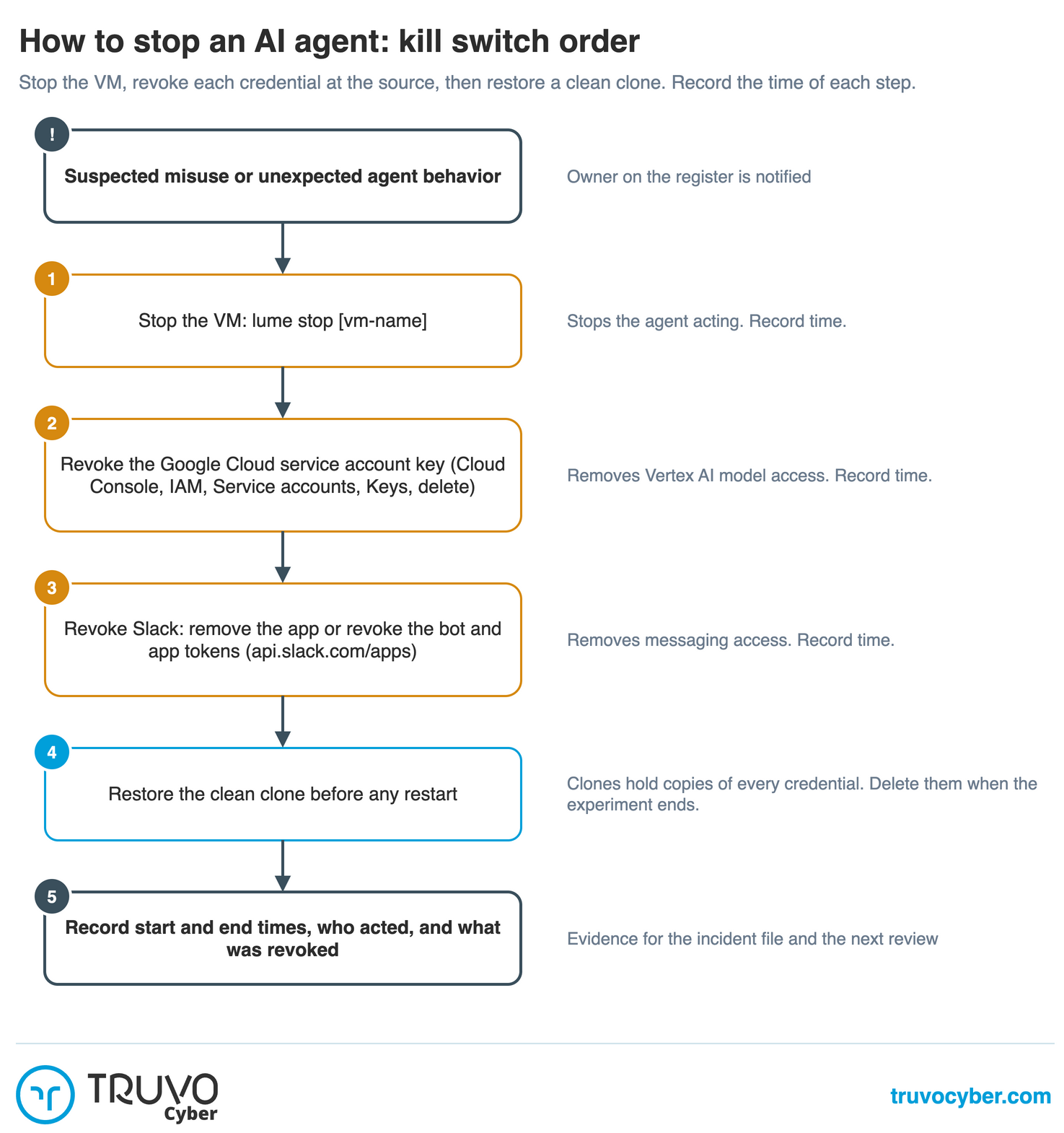
Figure: kill switch order for an AI agent. Click the diagram to enlarge it.
What is the next step after writing an AI agent threat model?
Anyone can reuse the threat model template, the tested configs and both diagrams from our lab repository, and we welcome issues and corrections there. Truvo Cyber builds and reviews threat models for AI agents as part of security architecture engagements.
Threat model your AI agents
Build an effective security program around the agents your teams already run.
Frequently Asked Questions
What is an AI agent threat model?
An AI agent threat model is a written record of what an agent can access, which attacks could misuse that access, and which control limits or detects each attack. The record includes credentials, reachable systems, network exposure, accepted risks and the shutdown procedure.
How is threat modeling an AI agent different from threat modeling an application?
An agent chooses tool calls from text inputs, so any content the agent reads can steer the actions the agent takes. A threat model for an agent therefore adds a row for each input source (messages, web pages, files) and for each tool, on top of the usual data flows. OWASP classifies this case as ASI01 Agent Goal Hijack and LLM01 Prompt Injection.
Should the threat model use OWASP or MITRE ATLAS?
Both are useful. OWASP organizes risks by category, which suits a risks table, while MITRE ATLAS catalogs adversary techniques, which suits red-team planning and detection rules. We used OWASP for the lab model because OWASP's risk categories pair directly with controls.
How often should an AI agent threat model be reviewed?
Review the model after every agent software update, every new tool or credential, and every new data source. We re-check each setting in the lab after every OpenClaw update, because a new default can add a tool that the deny list does not cover.
Does a threat model count as audit evidence?
A dated threat model with named risks, owners and decisions is evidence for the SOC 2 risk assessment criteria and for the ISO 27001 risk assessment requirements. The credentials table and the network check results are also evidence for access control (SOC 2 CC6.1, ISO 27001 A.5.15).