
.svg)
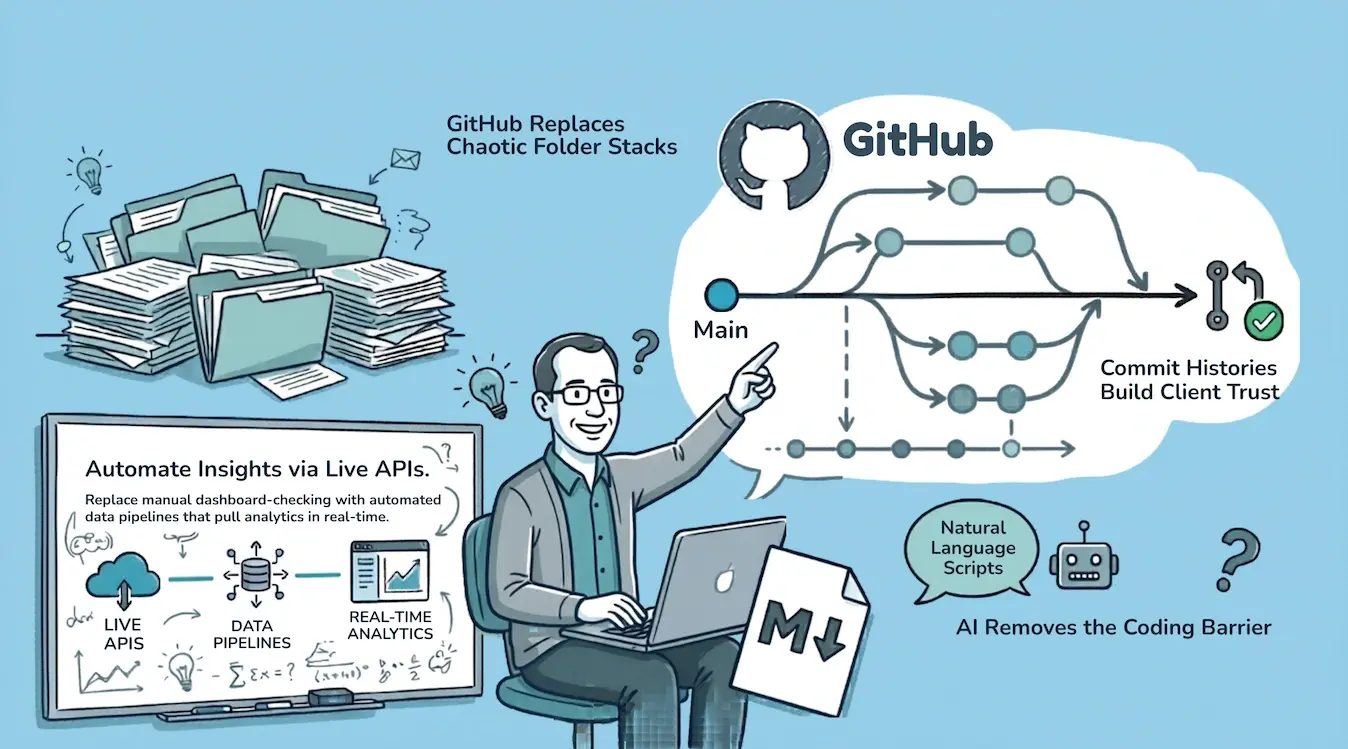
For years, programmers had an unfair advantage over the rest of us.
Not because they could build software. Because they could access data. Rich, detailed, actionable data sitting behind APIs that every major service exposes. Google, HubSpot, AWS, QuickBooks. The data was always there. You just needed to know how to talk to the API.
If that wasn't your day job, you were locked out.
AI changed that. I don't write code. I describe what I want, and Claude writes the scripts. The barrier between "technical" and "non-technical" is gone.
I run a cybersecurity consulting firm called Truvo Cyber. Over the past year, I've rebuilt how we operate from the ground up, using the same tools software teams have used for decades: version control, CI/CD, secrets management, automated testing. Except I'm not building software. I'm running a consulting practice.
I call it Consulting as Code.
A note before we go further: after we started using this term, I discovered that someone has already written about Consulting-as-Code as a theoretical framework, approaching it as a deterministic system for turning strategic work into executable logic. Interesting reading, and worth a look.
What I'm writing about here is different. This didn't start from theory. We didn't read a whitepaper and decide to implement it. We just kept automating things that were painful, kept putting things in GitHub because it made sense, and at some point looked around and realized we had a system. The name came after the practice. The practice came from doing the work.
The Problem With How Most Consulting Firms Operate
Most consulting firms run on a mess of disconnected tools.
Client work lives in SharePoint or Google Drive. Policies live in a GRC platform. Meeting notes live in email threads. Diagrams live in Lucidchart or Visio. Reports live in Word documents with "v3_final_FINAL_revised" in the filename. Analytics live in five different dashboards that nobody checks regularly.
The problems stack up:
- Nobody knows where the latest version of anything is. Was the policy updated in the GRC tool or the Word doc? Which one is current?
- Nobody can audit who changed what. Someone edited the risk assessment last Tuesday. Who was it? What did they change? Why?
- When someone leaves, knowledge walks out with them. Their laptop had the latest versions. Their browser had the saved passwords. Their head had the context.
- Nothing talks to anything else. Checking the status of five clients means logging into five platforms, clicking through five GUIs, and piecing together a picture manually.
I had all of these problems. I'm not a developer. I didn't come from a software background. But I kept watching how software teams work and thinking: why can't I run my practice like that?
The core insight
Software teams solved the version control, collaboration, and automation problems decades ago. Consulting firms are still emailing Word documents with "v3_final" in the filename. The tools exist. The barrier was always technical skill, and AI just removed it.
The Architecture
The setup is simpler than it sounds. Five components.
Claude Code
Claude Code runs on my laptop. It's my interface to every API I use. I describe what I want in plain language, it writes the scripts, and I get the output. I don't need to understand Python or API documentation. I need to understand what question I'm asking.
GitHub Repositories
GitHub is home base. Everything lives in repos. Each client gets their own repo, completely isolated. Marketing has a repo. Internal operations has a repo. Each app we've built has a repo. A repo is just a folder on my laptop that syncs to the cloud with full version history.
Every change has a timestamp, an author, and a reason. Every file has a complete history. If I need to know what a policy looked like six months ago, I check the history. If I need to know who changed a diagram, I check the log. No detective work. No "does anyone remember when we updated this?"
GitHub Actions
GitHub Actions handles automation. This solved three problems at once.
Scheduling. I don't need to remember to run reports. They just run. Our weekly analytics report, our content audits, our evidence status checks, they execute on a schedule without anyone thinking about them.
Secret management. API keys for Google, HubSpot, AWS, GRC platforms, they're all stored in GitHub Secrets. The team can reference them in scripts but can't read them directly. No more API keys in spreadsheets or sticky notes.
No servers. The classic automation trap: you build something useful on your laptop, and then you need a server to run it permanently. GitHub Actions eliminated that. The automation runs in the cloud, on a schedule, with no infrastructure to maintain.
Why GitHub Actions matters for non-developers
Most automation dies because it lives on someone's laptop. GitHub Actions runs in the cloud on a schedule. No server to maintain, no "it only works on my machine" problems. The automation runs whether you're at your desk or not.
APIs
Every major service exposes an API. Google Search Console, Google Analytics, HubSpot, GRC platforms, cloud providers, diagramming tools. APIs are the connective tissue. We pull data in, push content out, and monitor everything programmatically.
The breakthrough isn't that APIs exist. They've existed for years. The breakthrough is that AI can write the integration code for you. What used to require a developer now requires a good question.
Markdown Files
Markdown is the workhorse format. Plain text is too plain. Word documents are too heavy. Markdown sits in the perfect middle: just enough formatting to make documents readable, without any of the overhead.
Policies, procedures, meeting summaries, architecture notes, project plans, internal reports. All .md files. All version controlled. All perfectly readable in GitHub, in any text editor, and by every AI tool.
The only time we convert to .docx is for final client deliverables. Clients expect polished Word documents, and that's fair. We write everything in markdown, and Pandoc converts it to a formatted .docx with proper styling. The content is written and reviewed in markdown. The .docx is just the packaging.
What It Looks Like in Practice
The concept only matters if it works. Here's what Consulting as Code looks like day to day.
Website and Content Management
Our website runs on HubSpot. Through the HubSpot API, I audited all 50+ blog posts in two days: grammar, meta descriptions, internal links, broken links, keyword coverage. Claude churned through every post and surfaced issues. Fixes were pushed back through the API. No manual editing in the HubSpot GUI, post by post.
Analytics That Actually Drive Decisions
I used to log into Google Search Console, stare at charts, and think "now what?" Through the API, I pull the exact queries driving traffic to each page. I can see where we're ranking but not on page one. I can see questions people are asking that we're not answering.
I married that with Google Analytics data (bounce rates, traffic patterns) and HubSpot analytics (conversions, popular pages). Three data sources, one combined report, run weekly. Every week the picture gets clearer. Every fix makes the next report more useful.
Security Audits
We take read-only access to a client's cloud environment and run security audits against CIS benchmarks using Claude. No third-party scanning tools we don't fully understand. No scripts someone else wrote that might be outdated. The scripts live in version control. The credentials sit in GitHub Secrets. Everything is auditable, and if a client wants to see exactly what was run and when, it's all in the commit history.
Transparency as a competitive advantage
When a client asks "what exactly did you check?" we don't send a summary. We show them the script, the scope, and the commit history. Every audit has a complete paper trail, not because we built a reporting tool, but because that's how version control works.
Architecture Diagrams
One of the first things we do with any client is understand their architecture. That means network diagrams, data flow diagrams, system architecture documents. We generate all of them as code.
We started with Mermaid syntax for data flows, which is nearly perfect out of the box. Then we discovered draw.io files are just XML, and Claude can generate and edit XML beautifully. The result: version-controlled, diffable diagrams that anyone can open in draw.io.
Network diagrams still need manual finishing. AI gets the template right, applies our color conventions (red for inbound traffic, yellow post-firewall, green for internal), and places boxes roughly where they should be. But the layout still needs a human eye. The point is that the tyranny of the blank page is gone. The first draft, the most intimidating part, is instant.
Compliance Monitoring
Each client's compliance status gets pulled daily through GRC vendor APIs into their GitHub repo. I don't log into five platforms to check on clients. I check the repos. If anything changed, I can see the diffs. If I want to know what evidence was submitted for a specific control, I ask Claude to search the text files. If I refine control language for one client, I can audit whether that improvement applies to every other client in seconds.
The GRC platforms still do the actual work: evidence submission, policy management, audit workflows. But the visibility work is completely off-platform.
Access Control and Client Trust
A reasonable question: does it make clients uncomfortable that their data lives in GitHub repos?
Here's why it's actually more trustworthy than the alternative.
GitHub's access control is dead simple. Each client has an isolated repo. We add team members who are working on the engagement. We remove them when it's done. If a client wants access to their own repo, they get it. The permissions audit takes ten seconds.
Compare that to a shared drive with nested folders, inherited permissions, and no easy way to see who accessed what. Or a GRC platform where you can't easily audit which consultant looked at which tenant and when.
Everything in GitHub has a complete audit trail. Every file change, every access grant, every automation run. For a cybersecurity consulting firm, running operations on a platform with built-in auditability isn't a risk. It's a feature.
What This Means for Clients
This isn't just about making our lives easier. Every piece of this directly benefits the people we work with.
Full transparency. Clients can see exactly what was done, when, and by whom. Security audit? The script, the scope, and the findings are all in the commit history. Policy update? The diff shows exactly what changed. No black boxes. No "trust us, we checked."
Consistency across engagements. Every client gets the same rigorous process. Templates, automation, and version-controlled workflows mean nothing gets missed because someone forgot a step. The process is encoded, not memorized.
Faster delivery, same depth. Automating the administrative overhead means more time goes into the work that actually matters: understanding the client's environment, making judgment calls, solving real problems. Diagrams that used to take hours appear in minutes. Evidence reviews that used to take a full day happen in an hour. That time goes back into depth, not overhead.
Knowledge doesn't walk out. If a team member leaves mid-engagement, every decision, every document, every diagram is in the repo. The next person picks up with full context in an hour. No tribal knowledge. No "ask Sarah, she knows how this client works."
Built-in due diligence. Need to demonstrate how client engagements are managed? The version history, access logs, and process documentation are all there, not as a report someone prepared, but as the natural output of how we work. Every policy revision, every audit scope, every evidence check has a timestamp and an author.
Improvements compound. When we find better control language for one client, we check whether it applies to every other client. Tighter evidence workflows, improved templates, cleaner policies, they propagate. Every client benefits from the work we do for every other client.
Policies as Living Documents (For Real This Time)
Everyone says policies are "living documents." In practice, they live in a Word file that gets updated once a year before the audit.
When policies are markdown files in a GitHub repo, they're actually living. Team members or clients can submit a pull request against a policy, the same way developers submit pull requests against code. The change gets reviewed, discussed, and merged. The history shows exactly what changed and why.
This creates two powerful workflows:
Auditing requirements against reality. Clients can use AI to compare what their policies say they do against what they actually do in practice. The policy is a markdown file in a code repository, which means it's ingestible by whatever AI coding tool they use. If there's a mismatch, they have two options: adjust their practice to match the policy, or submit a pull request to adjust the policy to reflect reality. Either way, the gap gets closed.
Continuous improvement, not annual rewrites. Instead of a painful annual policy review where someone reads through 30 documents and wonders what's still accurate, changes happen incrementally throughout the year. Someone notices the incident response process changed? Pull request. New tool replaced an old one? Pull request. Each change is small, reviewed, and tracked.
And here's the thing that makes all of this actually work: the policies live where the developers already live. GitHub is their natural habitat. They're in it every day, pushing code, reviewing pull requests, checking CI pipelines. When the security policy sits right next to their codebase, in the same repo or the same organization, it stops being a PDF nobody reads and starts being something they actually interact with.
That's policy as code. For real. Not a buzzword. Not a vendor pitch. The policy is literally a file in a code repository, editable with the same tools, reviewable with the same workflow, and auditable with the same history as the code it governs.
Policy as code in practice
When a policy is a markdown file in GitHub, it's not just version-controlled. It's searchable by AI, diffable by auditors, and editable by the same people who write the code it governs. The policy stops being a document and starts being part of the system.
What This Isn't
Consulting as Code doesn't replace judgment, experience, or client relationships. It replaces the administrative overhead that buries all three.
I still meet with clients. I still review everything before it ships. I still need to know what good looks like for every framework we work with. The concepts, the expertise, the pattern recognition from years of engagements, none of that is automated.
What's automated is the tedious stuff: pulling data from five dashboards, reformatting reports, checking evidence status, auditing documents for consistency, generating first drafts of diagrams.
The time I used to spend on administrative friction now goes into the work that actually matters.
Getting Started
If you're running a consulting practice and this resonates, here's where to start:
- Pick one painful workflow. Don't try to move everything at once. Find the task you dread most, checking analytics, auditing documents, pulling status reports, and automate that first.
- Set up a GitHub repo. Even if you've never used GitHub, the learning curve is gentle. Create one repo for your business. Start putting documents in it.
- Try one API. Whatever service you spend the most time clicking around in, check if it has an API. Ask Claude or ChatGPT to pull data from it. The first time you get useful data without touching a GUI, you'll be hooked.
- Switch to markdown. Start writing internal documents in .md instead of .docx. The simplicity is addictive.
It compounds from there. One automation leads to the next. One repo leads to five. Before long, it's just how you operate.
See Consulting as Code in Action
We build effective security programs that run themselves.
Where This Is Going
I'm documenting this journey publicly. Partly because I think the idea is bigger than my firm. Any consulting practice, any professional services business, could run this way. And partly because I want to test whether anyone else finds this interesting.
If Consulting as Code resonates, I'll keep writing about it. Specific use cases, tools, workflows, mistakes, things that didn't work.
If you want to follow along, I'm sharing regularly on LinkedIn and writing deeper pieces here on the blog.
More in this series:
- Google Search Console API + Claude: Useless Data Into a Content Roadmap
- GRC Engineering: What It Looks Like in Practice
- Diagram as Code: How We Replaced Lucidchart
- Down With .docx, Long Live .md
By the way, we run a free security program readiness scorecard if you want to see where your organization stands. Takes 5 minutes. You'll get a summary score immediately, and we'll ask for your email if you want the full detailed breakdown.
Frequently Asked Questions
What is Consulting as Code?
Consulting as Code is an operating model for running a consulting practice using the same tools software teams use: version control (GitHub), CI/CD automation (GitHub Actions), APIs, and AI-assisted scripting. Instead of managing client work across disconnected tools like email, shared drives, and spreadsheets, everything lives in code repositories with full version history, automated workflows, and programmatic access to every platform the business touches.
Do I need to know how to code to use Consulting as Code?
No. That's the entire point. AI tools like Claude Code let you describe what you want in plain language, and they write the scripts. You need to understand what question you're asking and what output you need, but you don't need to understand Python, JavaScript, or API documentation. The barrier between "technical" and "non-technical" has effectively disappeared for this kind of work.
How does GitHub work for consulting firms that aren't software companies?
GitHub is a version control platform, which means it tracks every change to every file with a timestamp, an author, and a description. For consulting firms, that translates to complete audit trails on policies, deliverables, and project documentation. Each client gets an isolated repository. Team members get access only to the clients they work on. When someone leaves, their access is revoked instantly, but every piece of work they contributed remains in the history. It solves the "knowledge walking out the door" problem that plagues most professional services firms.
Can you run a consulting business entirely through APIs?
Not entirely, but you can automate a surprising amount of the operational overhead. APIs let you pull analytics from Google Search Console and Google Analytics, push and pull content from your CMS, monitor compliance status across GRC platforms, and generate combined reports from multiple data sources, all without logging into a single dashboard. The judgment calls, client relationships, and expertise still require humans. The data gathering, formatting, and status checking can run programmatically.
Is it secure to store client data in GitHub repositories?
GitHub's access control model is more auditable than most alternatives. Each client gets a private, isolated repository. Team members are granted access per-repo and removed when an engagement ends. Every file change, access grant, and automation run is logged. Compare that to a shared Google Drive with inherited folder permissions or a GRC platform where you can't easily audit which consultant accessed which tenant. For a cybersecurity consulting firm, running operations on a platform with built-in auditability, encrypted storage, and granular permissions is a stronger posture than the typical shared-drive-and-email approach.
Ready to Start Your Compliance Journey?
Get a clear, actionable roadmap with our readiness assessment.
Contact Us
Sample SOC 2 Control List
Input your email to download the list.
About the Author

Former security architect for Bank of Canada and Payments Canada. 20+ years building compliance programs for critical infrastructure.