
.svg)
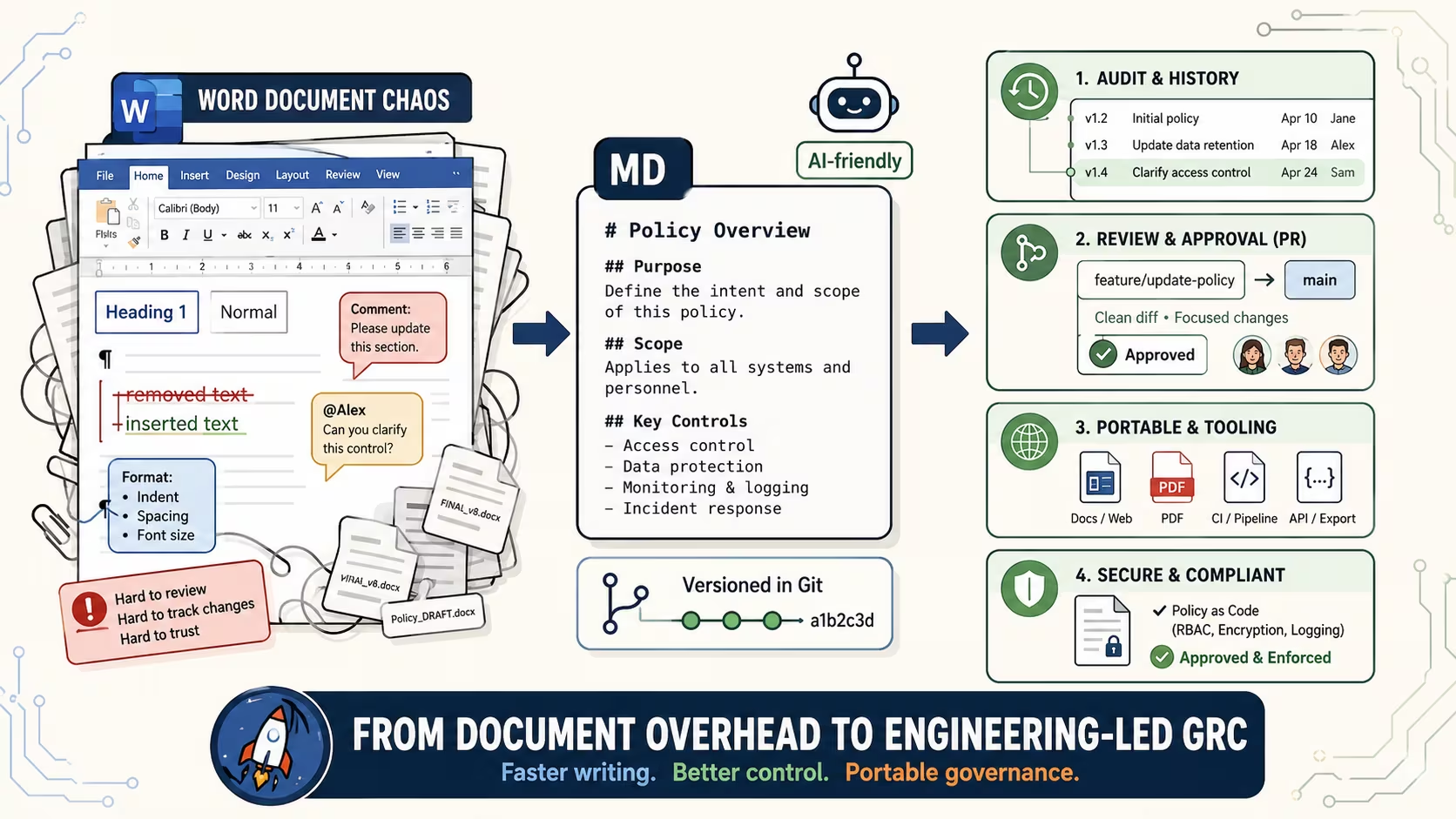
In 2026, documentation needs to be easily readable by humans and AI. Plain text is too plain. You need headings, bold, lists, and tables to make a document readable.
But .docx is too much. Way too much. The formatting is fiddly, the files are bloated, and version control is a nightmare. "Risk_Assessment_v3_final_FINAL_AK_edits.docx" is not a version control system.
Markdown sits in the perfect middle. And it's become the workhorse of how we run our consulting practice.
Why Word Documents Break Down
Word works fine for a single document that one person edits. It starts breaking down the moment you add complexity.
Version control doesn't exist. Your options are "save as new file" or "track changes." Both are terrible at scale. When you have 50 policy documents across 10 clients and need to know who changed what and when, Word offers nothing.
Formatting is fragile. Copy-paste from one document to another and the styles break. Someone uses a different font. Bullet points don't align. Half the document is in one style and half in another. You spend 20% of your time writing and 80% fighting with formatting.
Collaboration is painful. Email the file. Wait for edits. Get back a file with a different name. Try to merge two sets of edits. Give up and do it manually.
AI struggles with .docx. Try asking Claude or ChatGPT to edit a Word document. The .docx format is a zip file containing XML, styles, relationships, and metadata. It's heavy. Processing is slow. The output is inconsistent. Formatting breaks in unpredictable ways.
Files are large. A one-page Word document can be 50KB. The same content in markdown is 2KB. When you have hundreds of documents in a repository, this matters.
The Real Cost of Word
The time spent on formatting, merging edits, and managing file versions adds up fast. For a consulting firm managing dozens of client policy sets, it becomes a measurable drag on delivery speed.
Why Markdown Works
Markdown is plain text with a few symbols for formatting. A hashtag gives you a heading. Stars give you bold. Dashes give you a list. That's the entire learning curve.
That renders as a clean, formatted document everywhere. GitHub, VS Code, Obsidian, Notion, any text editor. The formatting is in the text itself, so it can never break.
Perfectly Consistent
Every markdown file looks the same. There's no "this one has weird spacing because someone pasted from Word" problem. The formatting is always clean because there's almost nothing to mess up. A heading is always a heading. Bold is always bold. The simplicity enforces consistency.
Natively Supported on GitHub
This is the big one for our workflow. GitHub renders markdown beautifully, right in the browser. Anyone with access can read the document without downloading anything or having any specific software.
More importantly, diffs work perfectly. When someone edits a markdown file and pushes the change, GitHub shows you exactly what changed: which lines were added, removed, or modified. Try diffing two .docx files. You can't. With markdown, every change is visible and auditable.
AI-Native
Every AI tool handles markdown natively. Generate a policy? It comes out in markdown. Summarize a meeting? Markdown. Draft a report? Markdown. The output is clean, consistent, and ready to use immediately.
This is the format AI thinks in. When you ask Claude to write a document, it naturally produces markdown. When you ask it to edit a document, markdown is the format it handles most reliably. Working in markdown means zero friction between human writing and AI-assisted writing.
Why This Matters for Security Programs
When your policies live in markdown on GitHub, every edit is a commit with a timestamp and an author. Auditors asking "when was this policy last reviewed?" get an answer in seconds, not a scramble through SharePoint.
Readable Everywhere
Markdown files open in literally any text editor on any operating system. They render in GitHub, GitLab, VS Code, Obsidian, Notion, Bear, Typora, and dozens of other apps. The files are tiny, so they load instantly and search instantly.
You're never locked into a tool. If you switch from one editor to another, your files just work.
What We Write in Markdown
Everything internal:
- Policies and procedures - access control, incident response, data handling, acceptable use
- Meeting summaries - client calls, internal discussions, decision logs
- Architecture notes - system descriptions, design decisions, change records
- Risk assessments - risk registers, treatment plans, residual risk tracking
- Project plans - engagement scoping, milestone tracking, deliverable checklists
- Internal reports - weekly analytics, audit findings, status updates
- Proposals and scoping documents - before they become client-facing deliverables
That's 99% of our text work.
The One Exception: Final Client Deliverables
Clients expect polished Word documents. A risk assessment delivered as a .md file would raise eyebrows. And that's fair. Client deliverables need professional formatting: cover pages, headers, footers, page numbers, table of contents, corporate styling.
So we write everything in markdown, and when it's time to deliver, an automated script converts the markdown to a formatted .docx with proper styling.
The script applies our document template: fonts, colors, heading styles, page breaks, table formatting. The content was written and reviewed in markdown. The .docx is just the packaging for delivery.
This means:
- The content is always version controlled (in markdown)
- The formatting is always consistent (applied by script)
- Nobody spends time on Word formatting ever
- The deliverable looks professional every time
Write Once, Deliver Anywhere
The same markdown source can produce a Word document for the client, an HTML page for the website, or a PDF for a board presentation. The content stays in one place. The format is just output.
Markdown for Compliance Documentation
If you're in GRC, compliance, or consulting, markdown has a specific advantage for policy documents.
Policies change. Auditors want to know when they changed and what changed. With Word documents, that question is hard to answer unless someone maintained a change log manually (they didn't).
With markdown files in GitHub, every policy has a complete, automatic change history. When was the access control policy last updated? Check the git log. What changed? Check the diff. Who changed it? Check the commit author.
This isn't theoretical. We've had auditors ask "show me your policy revision history" and answered in ten seconds by pulling up the git log. Try doing that with a SharePoint folder full of Word documents.
What Clients Get
Clients might not know or care that their policies are written in markdown. But they feel the difference.
Faster turnaround. Documents that used to take hours of formatting take minutes. The time saved goes into content quality, not making bullet points align.
Consistent deliverables. Every report, every policy, every assessment follows the same formatting template. The automation enforces it. No variation depending on who wrote it or which version of Word they used.
Complete revision history. Every change to every document is tracked automatically. When a client asks "when was this policy last updated and what changed," the answer is instant. Not a manual change log someone may or may not have maintained.
Continuity between engagements. If we come back for a follow-up engagement a year later, every document is exactly where we left it, with full history. No "we think the latest version is on the old SharePoint site somewhere."
Getting Started
If you want to try this:
- Pick one document type. Internal policies are ideal. They're formatted simply, referenced frequently, and benefit most from version control.
- Convert one document. Take a Word policy, paste the content into a .md file, and add the markdown formatting (headings, bold, lists). It takes five minutes. It will feel liberating.
- Put it in a Git repo. Even if you're new to Git, a single repository for your documents gives you version history from day one.
- Set up a conversion script. When you need .docx output, tools like Pandoc convert markdown to Word with custom templates. One command, consistent output every time.
- Don't convert everything at once. New documents get written in markdown. Existing documents get converted when they're next due for review. Over a few months, everything migrates naturally.
The simplicity is addictive. Once you've been writing in markdown for a few weeks, opening Word will feel like putting on a suit to do yard work.
Start Small
You don't need to overhaul your entire document workflow overnight. Convert one policy, put it in a repo, and see how it feels. The migration happens naturally from there.
Documentation That Stays Current
We build effective security programs with version-controlled policies.
Frequently Asked Questions
Is markdown too technical for non-developers?
Not at all. Markdown uses a handful of symbols: # for headings, ** for bold, - for lists. Most people learn the basics in under ten minutes. Tools like Obsidian and Typora provide a visual editing experience that feels similar to Word, while keeping the underlying format as markdown.
Can markdown fully replace Word for business documents?
For internal documents, yes. For final client deliverables that need cover pages, headers, and corporate branding, you still convert to .docx at the end using tools like Pandoc. The key difference is that the content lives in markdown (version controlled, searchable, portable) and the .docx is generated output, not the source of truth.
How does version control work for markdown documents?
Markdown files are plain text, which means Git tracks every change automatically. Each edit creates a commit with a timestamp, author, and a line-by-line diff showing exactly what changed. This gives you a complete, auditable revision history without any manual change logs or file naming conventions.
Does markdown work for compliance and audit documentation?
It works exceptionally well. Auditors regularly ask for policy revision history, evidence of periodic reviews, and proof of who approved changes. With markdown in Git, all of that is built into the workflow. Every policy edit is a commit. Every review cycle is visible in the log. It's the difference between "let me check the SharePoint folder" and pulling up a git log in ten seconds.
What tools do you need to get started with markdown?
At minimum, any text editor (even Notepad) and a free GitHub account. For a better experience, Obsidian is an excellent markdown editor, and Pandoc handles conversion to Word, PDF, and HTML. VS Code with a markdown preview plugin is another popular option. The entire toolchain is free.
This is part of the Consulting as Code series.
More in this series:
Ready to Start Your Compliance Journey?
Get a clear, actionable roadmap with our readiness assessment.
Contact Us
Free Report: The CPCSC Compliance Playbook
Join the waitlist for a free copy when it’s released.
About the Author

Former security architect for Bank of Canada and Payments Canada. 20+ years building compliance programs for critical infrastructure.