
.svg)

A DKIM check confirms two things about a message: 1) that a system holding the sending domain's private key signed it, and 2) that the signed parts have not changed since. When a message arrives, the receiving server fetches the public key the sending domain published in DNS, recomputes a hash of the signed content, and compares that hash against the signature already in the message. If they match, DKIM passes. That result, DKIM pass or DKIM fail, becomes one input the receiving system weighs alongside SPF and DMARC before it decides what to do with the message.
What Information Does a DKIM Check Use?
A DKIM check relies on a specific set of pieces, each one worth defining before going further:
- The private key. Held only by the sending system, used to create the signature. It never leaves the signer and is never published anywhere.
- The public key. The private key's matching half. The sending domain publishes it in DNS so any receiving server can verify a signature without ever touching the private key.
- The selector, a short label carried in the signature's
s=tag. It tells a receiver which of a domain's public keys to fetch, since a domain can publish more than one. - The signing domain, the domain in the signature's
d=tag. This is the identity a DKIM check authenticates, and it is not automatically the same as the visible From address. - The DNS TXT record, published at
selector._domainkey.signing-domain, where the public key lives. - The body hash, carried in the
bh=tag, a hash of the message body used to detect whether it changed. - The signature itself, carried in the
b=tag, a cryptographic signature covering the selected headers and the body hash together.
DKIM Verification Process
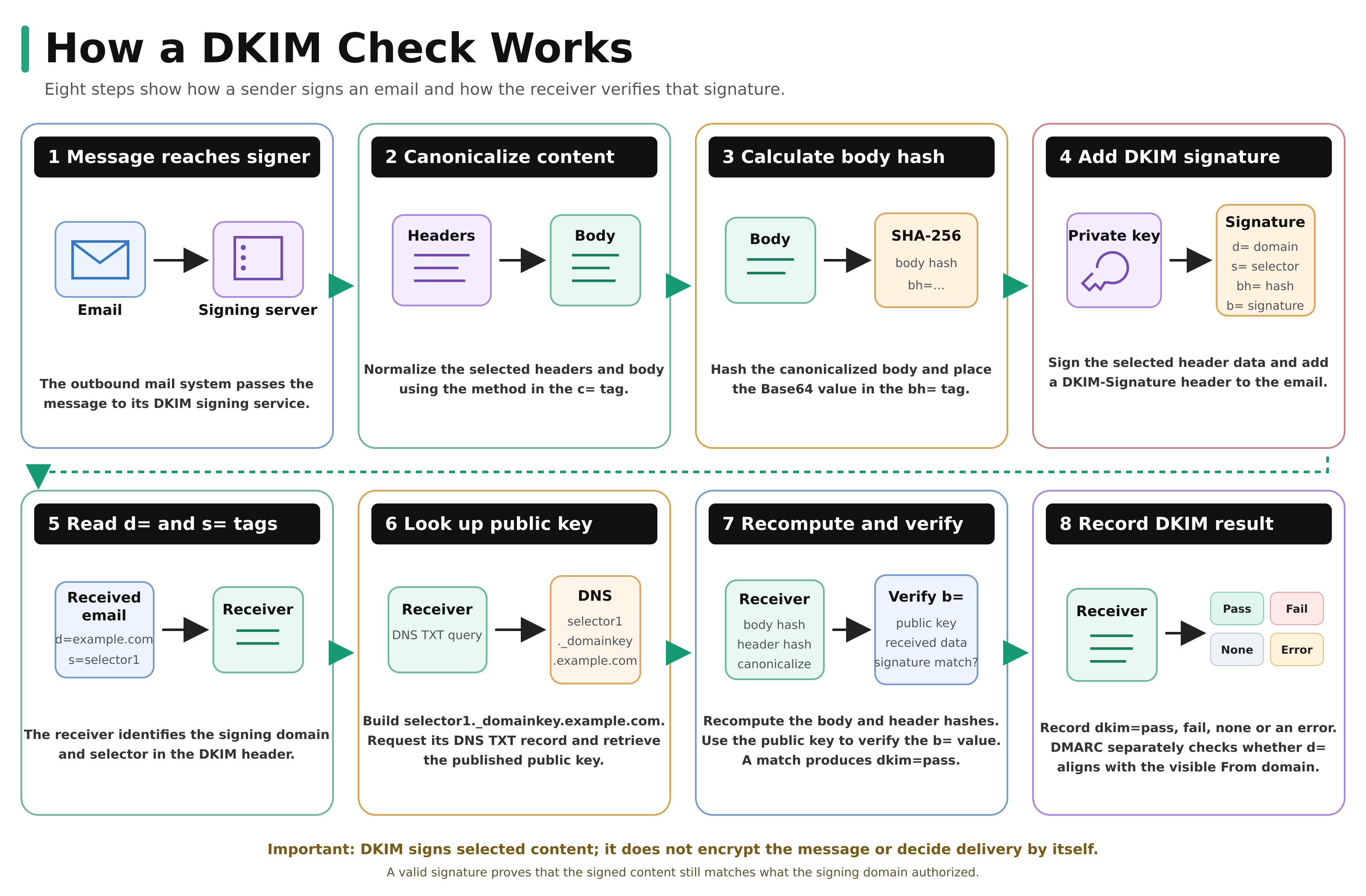
The sequence above splits cleanly into two sides: what the sending system does before the message leaves, and what the receiving system does after it arrives.
Sending & signing side
- The sending mail system passes the outgoing email to the DKIM signing service.
- The signing service canonicalizes the selected headers and message body according to the method identified in the
c=tag. Relaxed canonicalization tolerates certain harmless formatting changes, while simple canonicalization tolerates very few changes. - The signing service calculates the body hash and places it in the
bh=tag. - The signing service uses its private key to create the signature and adds the complete DKIM-Signature header to the message.
Receiving & verifying side
- The receiving mail server reads the
d=signing domain ands=selector from the DKIM-Signature header. - The receiving server uses the selector and signing domain to request the public key from
<selector>._domainkey.<signing-domain>in DNS. - The receiving server recomputes the canonicalized body hash and compares it with the
bh=value. It then uses the public key to verify theb=signature against the signed header data. - The receiving server records the result, such as
dkim=passordkim=fail, for the receiving system to use in later policy decisions.
The split matters because DKIM does not require a direct verification exchange between the sending and receiving systems. The sender creates a signature that stands on its own, while the receiver verifies it independently using information contained in the message and the public key published in DNS.
What Do the DKIM Tags Mean?
The DKIM-Signature header is a set of tag-value pairs, and a handful of them carry the information a verification check depends on.
| Tag | What it holds | Why it matters |
v |
The DKIM version, always 1 |
Confirms the header follows the current DKIM format |
a |
The signing algorithm, typically rsa-sha256 |
Tells the receiver which method to use when verifying |
d |
The signing domain | The identity DKIM authenticates; also what DMARC checks for alignment |
s |
The selector | Points to the exact DNS record holding the public key |
h |
The list of signed headers | Defines which parts of the message the signature covers |
bh |
The body hash | Lets the receiver detect whether the body changed |
b |
The signature | The cryptographic value the public key verifies |
A DKIM check is not only pass or fail in practice. A missing signature, a broken DNS lookup, or a revoked key each produce a different outcome, which is why receiving systems generally record a more specific result, such as none, pass, fail, or a temporary or permanent error, rather than treating every non-pass the same way.
How Does a Receiving Server Verify the Signature?
Verification comes down to redoing the signing math and checking whether the two sides agree. The receiving server takes the message as it arrived, applies the same canonicalization rules the signature specifies, and recomputes a body hash from the message body it received. If that hash matches the bh= value in the signature, the body has not changed. The server then uses the public key it fetched from DNS to check the b= signature against the signed headers; if that check succeeds, the signed headers have not changed either, and the signature was genuinely created with the matching private key.
A short, illustrative DKIM-Signature header makes the pieces easier to see. This is not a real signature and should not be copied anywhere:
DKIM-Signature: v=1; a=rsa-sha256; d=example.com; s=mail2026;
 h=from:to:subject:date; bh=2jmj7l5rSw0yVb/vlWAYkK/YBwk=;
 b=Kj8dR3mPz...
v=1 and a=rsa-sha256 identify the format and algorithm. d=example.com and s=mail2026 together point a receiver to mail2026._domainkey.example.com for the public key. h= lists which headers are covered. bh= and b= are the body hash and the signature the receiver checks against.
What Does DKIM Protect, and What Does It Not Protect?
DKIM's job is to prove that signed content has not been altered and that whoever signed it holds the domain's private key. It is also limited in specific ways worth stating directly. DKIM does not:
- Encrypt the email. A DKIM-signed message is just as readable in transit as an unsigned one; DKIM only adds a way to detect tampering.
- Make the final delivery decision. DKIM produces a result. The receiving system, not DKIM itself, decides whether to deliver, quarantine, or reject the message, usually in combination with SPF, DMARC, and its own reputation signals.
- Validate the visible From address by itself. DKIM authenticates the
d=domain, which is not guaranteed to match the address a recipient sees; that link is DMARC's job. - Survive every kind of forwarding. A signature that covers the body will break if a mailing list or forwarder edits the message content after it was signed.
- Say anything about unsigned mail. A message with no DKIM signature has no DKIM result to evaluate.
How Does DKIM Work With SPF and DMARC?
DKIM is one of two identities DMARC can check; SPF is the other. DMARC looks at whether the d= domain from a passing DKIM signature aligns with the domain visible in the message's From header, and a DMARC pass only needs one of SPF or DKIM to align, not both. The companion article on how SPF, DKIM and DMARC work together covers that alignment process, DMARC's policy levels, and how the three records combine in full.
Common DKIM Configuration Problems
- A key that is too short. Older or default keys under 2048 bits still work but are weaker than current recommendations call for.
- Test mode left on in production, which tells receivers to treat the mail as effectively unsigned.
- A selector typo, where the DNS record and the signature's
s=tag do not match, so every lookup fails. - Signing with the provider's own domain instead of the customer's, which produces a DKIM pass for the platform but never aligns with the customer's domain for DMARC.
- No key rotation, leaving a single long-lived key with no plan for replacing it if it is ever exposed.
The DKIM checker reads a domain's live public key over DNS and flags these problems directly, and the DKIM record generator builds a new key pair and record from scratch. The companion post on how an SPF check works covers the equivalent verification sequence for SPF.
See whether your own DKIM signature verifies
Truvo verifies SPF, DKIM and DMARC configuration as part of an effective security program, then hands over the evidence.
Frequently Asked Questions
Does DKIM encrypt email?
No. DKIM adds a signature that proves signed content was not altered; it does not encrypt the message. Anyone who can see the email in transit can still read it.
Does DKIM decide whether a message gets delivered?
No. DKIM only produces a result, pass or fail. The receiving mail system makes the actual delivery decision, weighing that result alongside SPF, DMARC, and its own filtering policy.
What is a DKIM selector?
A selector is the label in a signature's s= tag that tells a receiver which of a domain's public keys to fetch from DNS. It lets one domain publish and rotate more than one key at a time.
Can a message pass DKIM and still be spoofed?
Yes. DKIM only proves that whoever holds the signing domain's private key signed the message. If that signing domain is not the one a recipient sees in the From address, DKIM alone will not catch the mismatch; that check belongs to DMARC.
Key Takeaway
A DKIM check proves two narrow but useful things: that a holder of the signing domain's private key created the message's signature, and that the signed content has not changed since. It does not encrypt the message, and it does not make the final call on delivery; the receiving system does that using the DKIM result alongside SPF and DMARC. Configured with a current key length, kept out of test mode, and combined with SPF and DMARC, DKIM becomes a dependable piece of a domain's broader email authentication setup.